Viz Mosart User Guide
Version 3.9 | Published November 04, 2019 ©
Video Transition Area

The transition area is positioned between the preview and program windows.
Hold Video Transition (H)
Pressing Hold (H) will hold the video transition when the next template is called. Viz Mosart will wait to do the video mixer crosspoint change until a new Take Next command is issued when the hold video transition is active.
In a situation where you have CAM 1 in a program and a clip (PACKAGE) in preview and use the Take Next with Hold video transition, Viz Mosart will do all of the transitions between the two templates, except the vision mixer crosspoint change. Viz Mosart will fade down the sound from the CAM element and fade up the sound from the clip. It will start to play the video on the assigned video port, and all secondary items with an in-time will use the Take Next as the relative starting point.
The Viz Mosart GUI Program window will notify the user that the video transition is on hold and that the user needs to send a new Take Next to do the vision mixer crosspoint change. This functionality can also be toggled to be auto-taken in a template or by a keyboard shortcut key.
Next Transition
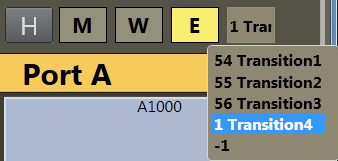
The type of the next vision mixer transition is shown in the transition area by highlighting the corresponding transition icon. Available transition types are Mix (M), Wipe (W) and Effect (E). In the value field to the right of the transition type boxes, the duration of Mix (M) or Wipe (W) is shown, or, for Effect (E), the name of the effect is shown.
The next vision mixer transition can be overridden by clicking on the corresponding transition icon in the transition area. For Mix (M) and Wipe (W) transitions, the duration of the transition (in frames) can be changed by clicking M or W, and then use the scroll-wheel, or right-click and drag up or down in the duration field.
Selecting Effect (E) and then clicking the empty square will cause a dropdown menu to appear, containing the transition effects stored in AV Automation's A/V Setup.
When Studio Setup is changed, the items in the dropdown are updated accordingly. For more information on configuring Studio Setup, see the Viz Mosart Administrator’s Guide > Audio and Vision Mixer Effect Setups.
The next transition type can also be selected by a TRANSITION TYPE control command. By default, this control command is assigned to the Tabulator key, which can then be used to cycle through the three transition types.