
Viz Mosart User Guide
Version 3.9 | Published November 04, 2019 ©
Standby Equipment from the GUI
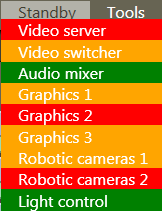
It is possible to standby equipment from the Viz Mosart GUI. To do so, use the Standby drop-down menu to select the desired device. Doing this means that all Viz Mosart commands to that equipment are disabled until they are selected from this menu again, or the AV Automation is restarted.
The colours in the menu have the following significance:
-
Green = Connected
-
Red = Disconnected
-
Orange = Standby
Whenever any device is put in Standby, the drop-down menu header is highlighted in orange to remind the operator that some equipment is in Standby mode. If a device is disconnected, the header is red, and this takes precedence over orange Standby status
