
Viz Mosart User Guide
Version 3.9 | Published November 04, 2019 ©
Exporting and Importing Keyboard Shortcuts
You can save sets of Viz Mosart keyboard shortcuts for reuse on other clients.
To Export your Keyboard Shortcuts
-
From the main Viz Mosart menu, select Tools > Keyboard shortcuts editor.
-
In the menu bar, select Layout > Export.
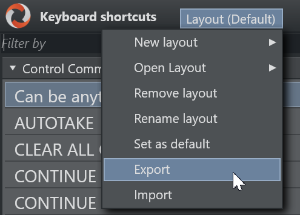
The file is held on the ManusAdmin server within the Viz Mosart system.
To Import Keyboard Shortcuts
-
From the main Viz Mosart menu, select Tools > Keyboard shortcuts editor.
-
In the menu bar, select Layout > Import.
These server-based shortcuts will overwrite your local shortcuts.
If desired, you can always import the server-based shortcuts (and overwrite any local definitions) when starting Viz Mosart.
-
Navigate to:
Tools > General settings > User interface > Keyboard > Import keyboard shortcuts on startup.