
Viz Mosart User Guide
Version 3.9 | Published November 04, 2019 ©
Audio
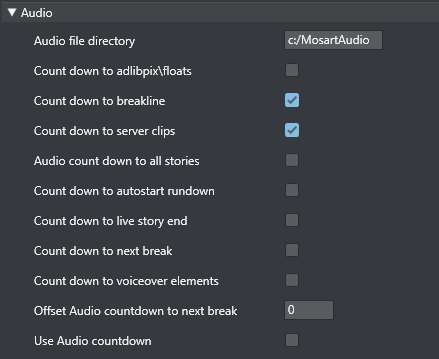
-
Audio file directory tells Viz Mosart where to find the audio countdown files. They must be in PCM WAV format (16 bit, 48 kHz), and follow this naming standard:
-
60_sec
-
30_sec
-
10_sec
-
5_4_3_2_1
These are only examples; the Viz Mosart GUI countdown feature will accept and play any file on the format above. Thus, a file named 47_sec will be played when 47 seconds remain of a given event if that is desired.
For the countdown to next break feature, the naming standard is: -
180_sec_Next_Break
-
120_sec_Next_Break
-
60_sec_Next_Break
-
30_sec_Next_Break
-
10_sec_Next_Break
-
5_4_3_2_1_Next_Break
-
-
Countdown to adlibpix\floats – Toggles an audio countdown file to be played from the Viz Mosart GUI PC when 3 minutes, 2 minutes, 1 minute, 30, 10 and 5 seconds remain until an adlibpix\float element with server\video content
-
Countdown to breakline - Toggles an audio countdown file to be played from the Viz Mosart GUI PC when 3 minutes, 2 minutes, 1 minute, 30, 10 and 5 seconds remain until a designated break line.
-
Countdown to server clips - Toggles an audio countdown file to be played from the Viz Mosart GUI PC when 1 minute, 30, 10 and 5 seconds remain of package templates.
-
Audio countdown to all stories – Toggles an audio countdown file to be played from the Viz Mosart GUI PC when 3 minute, 2 minutes, 1 minute, 30, 10 and 5 seconds remain until the next story.
-
Countdown to autostart rundown - Toggles an audio countdown file to be played from the Viz Mosart GUI PC when 3 minute, 2 minutes, 1 minute, 30, 10 and 5 seconds remain until the rundown will autostart.
-
Countdown to Live Story End - Toggles an audio countdown file to be played from the Viz Mosart GUI PC when 1 minute, 30, 10 and 5 seconds remain until the editorial duration end of a live story.
-
Countdown to Next Break - Toggles an audio countdown file to be played from the Viz Mosart GUI PC when 3, 2 and 1 minute, as well as 30, 10 and 5 seconds remain until the next break.
-
Countdown to voiceover elements - Toggles an audio countdown file to be played from the Viz Mosart GUI PC when 1 minute, 30, 10 and 5 seconds remain of voiceover templates.
-
Offset Audio Countdown to Next Break - Defines an offset in seconds for the countdown to next break feature.
-
Use Audio countdown – Play audio when counting down.