
Viz Mosart User Guide
Version 3.9 | Published November 04, 2019 ©
Count Down to a Selected Story
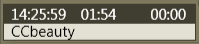
By right clicking over the info area of a story and selecting Countdown from the menu, a countdown clock with minutes and seconds to the selected story’s estimated on air time will appear in the middle of the info area.