
Viz Mosart User Guide
Version 3.9 | Published November 04, 2019 ©
Adding Stories to the Rundown
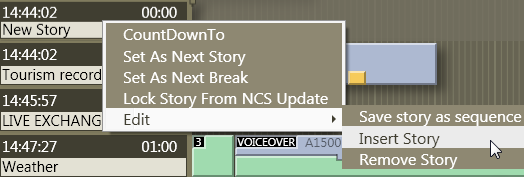
By right clicking on the info area and selecting Edit > Insert Story, you can insert a new story-line. Content can then be dragged into the new story from the Assets and Favorites tab, or inserted using the QuickEditor.
In addition you can also remove a story, add new items into a story, change the selected story as well as removing templates from a story.
Note: If story is locked with Lock Story from NCS Update, reload of the rundown (SHIFT+F12) will delete the new story. Only Lock Rundown from menu Rundowns will prevent deletion of the new story when reloading.