
Viz Mosart User Guide
Version 3.9 | Published November 04, 2019 ©
Timeline Keys
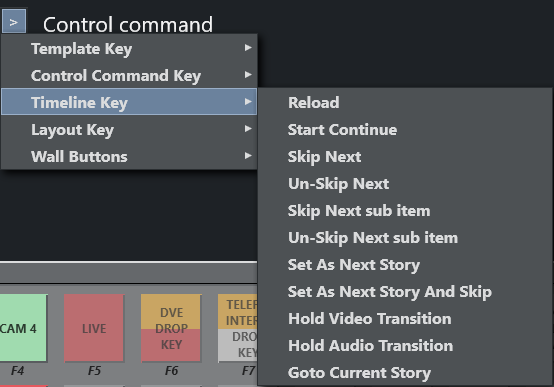
The Timeline Keys comprise basic commands that directly affect the running of a rundown in Viz Mosart:
Reload
Default SHIFT+F12
This command will stop playout and reload the current rundown, cuing the first story in the rundown in preview.
Start Continue
Default F12
This command will do one of four things:
-
Start a rundown which is currently not running, either at the top or at a point selected by the operator using the Set as Next Story command in the Rundown window.
-
Take the next template within a story to air.
-
Take the first template in the story set as next if there are no more templates left in the current story.
-
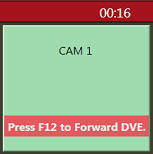
The Take Next command is also used to take continue points that have been set in a template, such as a DVE forward on the mixer. A warning appears in the bottom of the Program window to alert the operator that the next F12 will activate the continue point rather than take the next primary event.
PARAMETERS: A default transition type for F12 can be set.
Skip Next
Default F9
This command will skip the next item in the rundown. Repeatedly giving this command will skip several items.
Un-Skip Next
Default SHIFT+F9
This command will undo skipping performed with the Skip Next command, in reverse order.
Skip Next Sub Item
(No default button)
This command skips the next sub item, for example, a lower-third
Un-Skip Next Sub Item
(No default button)
This command undoes the latest Skip next sub item command
Set As Next Story
No default button
Sets the selected story as next
Set As Next Story And Skip
(No default button)
Sets the selected story as next and removes (skips) any remaining items in the current story.
Hold Video Transition
(No default button)
Hold the video transition. Same as pressing the top H-button on the program\preview panel
Hold Audio Transition
(No default button)
Hold the audio transition. Same action as pressing the bottom H-button on the Program \Preview panel