
Vizrt 2110 I/O Module User Guide
Version 1.1 | Published May 18, 2021 ©
Networking
Ethernet
Generally, connecting a suitable cable from one of the two Gigabit Ethernet ports on the backplane is all that is required to add it to a local area network (LAN), which typically serves for NDI I/O connections as well as more mundane networking chores. In some settings, additional steps may be required. You can access the system Network and Sharing control panel to accomplish more extensive configuration tasks. If further help connecting is required, please consult your system administrator.
SFP A and B (SMPTE 2110)
The two MSA compatible SFP cages (identified as SFP A and B) are provided.
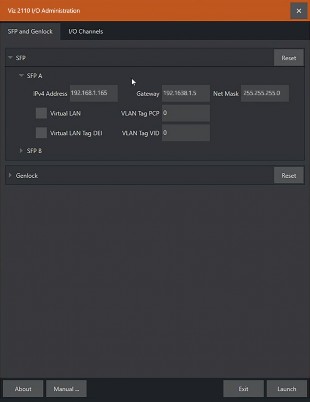
This is where you plug in your preferred SFP (Small Form-factor Pluggable) transceivers to connect and serve SMPTE 2110 traffic between external systems and your Viz 2110 I/O IP.
Each of the two SFP connection allows two SMTPE 2110 input connections and two outputs to SMTPE 2110 (for a total of four).