
Vizrt 2110 I/O Module User Guide
Version 1.1 | Published May 18, 2021 ©
Configuration and Administration
The configuration of the two SFP ports, Genlock, and (SMPTE 2110) I/O Channels is performed in Viz 2110 I/O IP’s Administration panel.
This control panel appears on first launch, and thereafter can be accessed by selecting Exit to Admin from the Desktop, or from the Windows start menu.
SFP Configuration
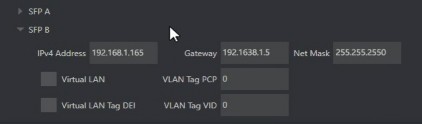
Click the SFP and Genlock tab and the header (A or B) for the SFP you wish to configure to expand its settings group.
As a minimum, you will need to supply the following values in order to identify the SFP connection on the network you wish to connect it to:
-
IPv4Address
-
Gateway
-
Net Mask
Optionally, enable the Virtual LAN switch if you intend these connections to be associated with a VLAN. In this case, continue to configure the following VLAN tags:
-
PCP: The Priority Code Point refers to the IEEE 802.1p class of service and maps to the frame priority level. PCP values can be used to prioritize traffic.
-
DEI: Enable the Drop Eligibility Indicator field indicates the frames eligible to be dropped when congestion makes it necessary.
-
VID: The VLAN IDentifier specifies the VLAN to which the frame belongs.
Genlock Configuration
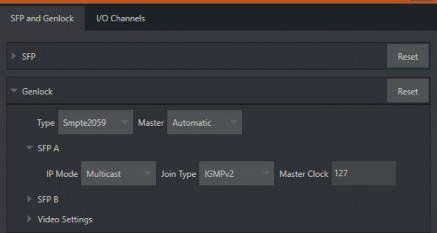
Genlocking provides a mechanism to ensure that your video sources are in sync with one another and other external systems. The Genlock tab in the Administration panel provides the necessary settings and options.
-
Type: Normally, you select SMTPE2059 as the method by which timing reference information is supplied to the system (the other option, Internal, uses the system clock for timing (free running) rather than an external reference).
-
Master: Either SFP (A or B) can be designated as the Genlock reference source, or you can select Automatic.
-
-
SFP (A/B): Configure the SFP you designated as Master (unless you selected Internal above).
-
IP Mode: Select the appropriate IP protocol, choosing Multicast, Unicast, or Hybrid.
-
Join Type: Choose None or IGMPv2.
-
Master Clock: Specify the for the Master Clock ID for genlock over IP.
-
-
Video Settings: Specify the Frame Rate, Type (choose between fielded and progressive options), Width and Height.
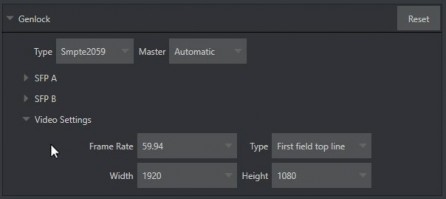
Note: The frame rate selected determines which optional formats are shown in the Live Desktop menus. For example, selecting 29.97 or 59.94 results in only NTSC format frame rate options being listed.
I/O Channels
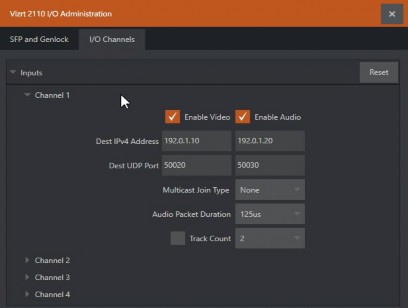
As mentioned previously, each SFP transceiver allows two SMTPE 2110 input connections (for a total of four) and two outputs to SMTPE 2110. Inputs 1 and 2, and outputs 1 and 2 are served by SFP A, while SFP B handles inputs 3 and 4 and outputs 3 and 4.
The settings for each input and output are configured individually in the I/O Channels tab of the Administration panel, as discussed next.
Inputs
After expanding an input control group, you typically check the Enable Video and Enable Audio switches. Then enter values and choose appropriate settings for the corresponding IP streams in the columns below.
-
Dest(ination) IPv4 Address: Reception multicast IPv4 address.
-
Dest(ination) UDP Port: Reception User Diagram Protocol (UDP) port.
-
Multicast Join Type: The membership request type when Dest IPv4 Address is a multicast address.
-
(Audio column only)
-
Audio Packet Duration: The duration of incoming audio packets.
-
Track Count (switch): Enable this to use a value entered at right to limit the IP stream track count received.
-
Outputs
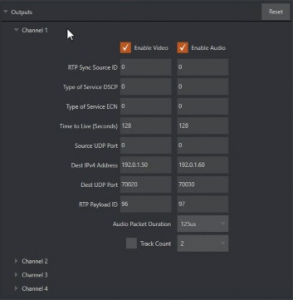
Expand the Outputs control group and continue in similar fashion to checkmark Enable Video and Enable Audio for each SMPTE 2110 output.
-
RTP Sync Source: The RTP (Real-time Transfer Protocol) Synchronization Source Identifier (SSRC).
-
Type of Service DSCP: Indicates that the Type of Service (ToS) is Differentiated Service Code Point (DSCP), with a range of [0-63] (6 bits)
-
Type of Service ECN: Indicates that the Type of Service (ToS) is Explicit Congestion Notification (ECN). Range is [0..3] (2 bits)
-
Time to Live (Seconds): The time in which packets can be used in seconds. That is, it indicates the packets' Time to live (TTL)
-
Source UDP Port: The User Datagram Protocol (UDP) port of the sender (the transmitter)
-
Dest(ination) IPv4 Address: The UDP port of the destination (the receiver). Only used in multicast.
-
Dest(ination) UDP Port: The UDP port of the destination (the receiver).
-
RTP Payload ID: The RTP (Real-time Transfer Protocol) payload ID.
-
(Audio column only)
-
Audio Packet Duration: The duration of outgoing audio packets.
-
Track Count (switch): Enable to use the value entered at right to limit the IP stream track count transmitted.
-
Administration Panel Footer Tools

At the bottom of the Administration pane are displayed About, Manual, Exit, and Launch buttons.
The operation performed by each of these is obvious, but we would like to highlight the fact that the About panel provides hardware and software version information that may be useful should you require product support, along with important licensing information.