Story Clip Production Setup
This workflow records the stories that the NRCS marks for recording and produces one clip per story, either during a live broadcast or in an offline session. Two clip outputs are available: TriCaster, where TriCaster cuts and optionally publishes the clips, and Mimir, where Mimir renders and ingests the clips. This page covers what the two outputs share: the choice between them, the NRCS story metadata, and the setup sequence. The output-specific settings are on TriCaster Story Clip Setup and Mimir Story Clip Setup.
This page covers step 19 and step 22 of the Story Recorder Setup Checklist. Work through steps 1 to 18 first: they cover the license, the installation order, the frame accuracy setup, the show design, and the video server.
Story Recorder needs frame accuracy in production. You can configure and test this output without genlock, but the marks will not be frame accurate. See steps 8 to 13 of the Setup Checklist.
Choosing the clip output
Component | TriCaster output | Mimir output |
|---|---|---|
Recorder | TriCaster | Harmonic Spectrum |
Transcoder/Renderer | TriCaster | Mimir |
Online publishing | TriCaster publish presets (optional) | Not used in this workflow |
Setup page |
The recorder follows the renderer: TriCaster cuts story clips from its own recordings, and Mimir renders story clips from Harmonic Spectrum recordings. The video switcher is independent of this choice, so TriCaster can act as video server and recorder while a different switcher runs the show.
Both outputs work with any NRCS that can provide the required story metadata fields via the MOS protocol. For the validated combinations and the product versions, see Supported Configurations in Story Recorder Setup.
Settings
Open the Manus Settings menu and set Enable Story Recorder to true. The remaining Story Recorder settings sections then become available.
The Clip Outputs settings are specific to the output device. See TriCaster Story Clip Setup and Mimir Story Clip Setup.
Save while Story Recorder is off, and restart the Mosart Logging Service after changing the Clip Outputs devices. See step 25 of the Setup Checklist.
NRCS Metadata for Story Clip Production
Each story that should be recorded must carry metadata that tells Viz Mosart to produce a clip. The metadata is the same for both clip outputs.
NRCS with built-in integration
Some NRCSs (for example, Saga) provide built-in Story Recorder integration. They include a <mosExternalMetadata> block at the story level in the MOS message (roStorySend):
<mosExternalMetadata> <mosScope>STORY</mosScope> <mosSchema>http://www.vizrt.com/mosObj/storyPublisher</mosSchema> <mosPayload> <Record>true</Record> <Publish>false</Publish> <StoryClipId>394e83ee-55cc-48a7-a5f8-92db7cc36e10</StoryClipId> <StoryClipSlug>My Story Name_anchor_clip</StoryClipSlug> </mosPayload></mosExternalMetadata>MOS Payload Element | Type | Purpose |
|---|---|---|
| bool | true: Mark the story for clip production. |
| bool | true: Also publish clip online (TriCaster only). |
| string | Clip identifier (for example, a Mimir anchor clip ID or a unique GUID) |
| string | Human-readable clip description |
The schema URI http://www.vizrt.com/mosObj/storyPublisher is what Viz Mosart matches on. The block can be present on every story; stories with Record=false are parsed but ignored by the publishing pipeline.
If another NRCS wants to support this integration, it needs to provide the same <mosExternalMetadata> structure with the storyPublisher schema.
NRCS via Newsroom Settings mapping (iNEWS, other systems)
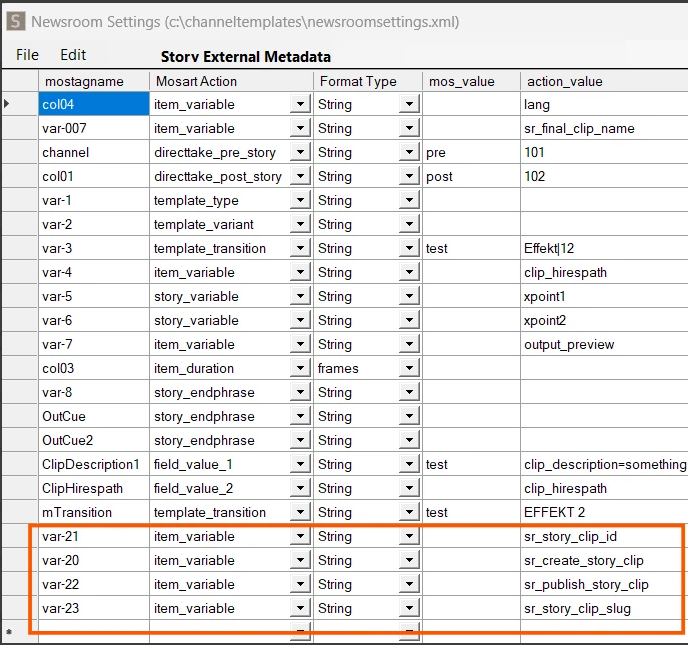
For an NRCS that does not use the storyPublisher schema, the same metadata can be delivered via MOS item variables. The fields are then mapped to Mosart through the Newsroom Settings (newsroomsettings.xml) Story External Metadata configuration:
Mosart field name | Mosart action | Purpose |
|---|---|---|
|
| Marks the story for clip production ( |
|
| Clip identifier (anchor clip ID or unique GUID) |
|
| Human-readable clip description |
|
| Marks for online publishing ( |
The NRCS column names are mapped to the corresponding sr_ action values. Both paths, the storyPublisher MOS schema and the Newsroom Settings mapping, produce identical results in Mosart. The following example shows how iNews columns (var-20, var-21, and so on) are mapped to Mosart item_variable actions with the corresponding sr_ action values:
Procedure
In the Manus Settings menu, enable Enable Story Recorder.
Configure the clip output on the device page: TriCaster Story Clip Setup or Mimir Story Clip Setup.
Configure the NRCS story metadata as described above.
Save the settings while Story Recorder is off. If you changed the Clip Outputs devices, restart the Mosart Logging Service on the Mosart Server machine.
Verification
Each device page ends with a numbered verification flow for its output. See Verification in TriCaster Story Clip Setup or Mimir Story Clip Setup.
Operator instructions for switching on and running Story Recorder are in Working with Story Recorder.