Mimir Story Clip Setup
This workflow records the stories that the NRCS marks for recording and produces one clip per story in Mimir. Viz Mosart records the program output on the video server, then asks Mimir to render each story segment out of the growing recording and ingest it as a clip. Operators can run it during a live broadcast or in an offline session.
This page covers the Mimir half of step 19 of the Story Recorder Setup Checklist. Work through steps 1 to 18 first. The setup shared by both story clip outputs, including the NRCS story metadata, is in Story Clip Production Setup.
Story Recorder needs frame accuracy in production. You can configure and test this output without genlock, but the marks will not be frame accurate. See steps 8 to 13 of the Setup Checklist.
What you need
On top of the general Story Recorder setup, this output needs:
A Generic REST device configured in Viz Mosart. This device handles the API communication with Mimir. See more details below.
A render job preset and a Kelda configuration set up in Mimir System Settings.
A transcription configuration in the Mimir tenant settings that matches the language code and transcription service you configure here.
For the validated combination of NRCS, recorder and renderer, and the product versions, see Supported Configurations in Story Recorder Setup.
Settings
Open the Manus Settings menu and set Enable Story Recorder to true. The remaining Story Recorder settings sections then become available.
Save while Story Recorder is off, and restart the Mosart Logging Service after changing the Clip Outputs devices, including this Mimir output. See step 25 of the Setup Checklist.
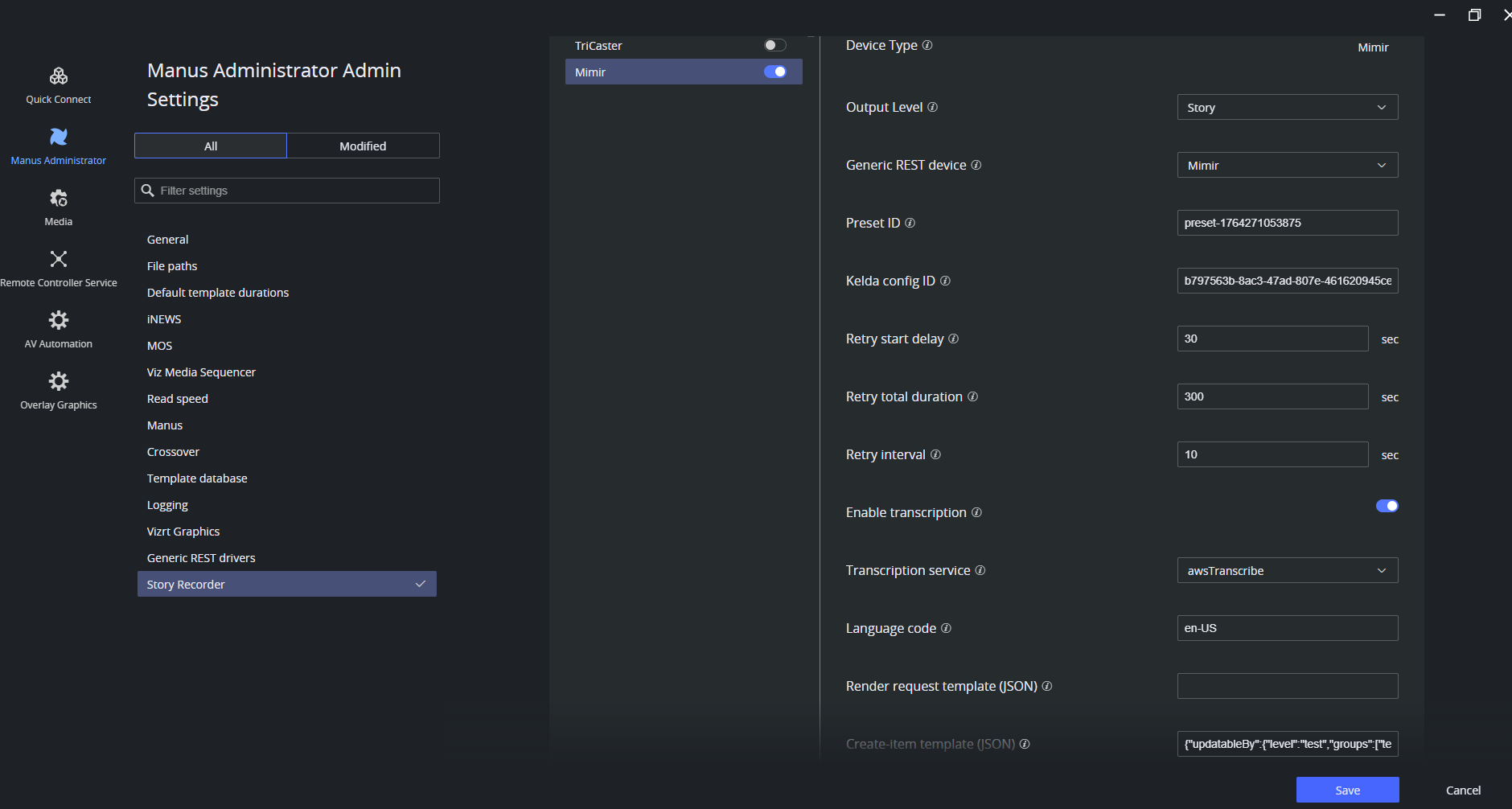
Clip Outputs > Mimir
Setting | Default | Description |
|---|---|---|
Output Level | Story | Read-only. Determines the granularity at which clips are produced. Currently, only story-level clips are supported with Mimir. At story-level, one clip is generated per rundown story. |
Generic REST device | (empty) | The Generic REST device configured for Mimir. This device handles the API communication with Mimir. |
Preset ID | (empty) | Identifier of the render job preset configured in Mimir System Settings. Determines the render profile used when producing the story clip. |
Kelda config ID | (empty) | The Kelda configuration ID, set up in Mimir System Settings. Kelda is Mimir's ingest orchestration component, this ID informs Mimir which ingest configuration to use when receiving the recorded media from the video server. |
Retry start delay |
| Delay before Story Recorder starts checking ingest status and retrying, after the publish command is sent to Mimir. Allows time for the initial render/ingest to start. |
Retry total duration |
| Total time to spend on ingest checking and render retries before giving up. If all retries are exhausted, the publish is reported as failed. |
Retry interval |
| Time between consecutive ingest checks and render retries. |
Transcription and request templates
Setting | Default | Description |
|---|---|---|
Enable transcription |
| Request a transcript for the rendered story clip. |
Transcription service |
| Transcription service provider Mimir uses. The (language code, service) pair must match a transcription configuration in the Mimir tenant settings. For a provider not listed, set it via the render template. |
Language code |
| BCP-47 language code for transcription (e.g. en-US). The (language code, service) pair must match a transcription configuration in the Mimir tenant settings. |
Render request template (JSON) | (empty) | JSON merged into the Mimir render request: analyticConfig, delegate, visibleTo, output profile. |
Create-item template (JSON) | (empty) | JSON merged into the Mimir create-item (placeholder) request: item type, transcription, access control, folders. |
Create-version template (JSON) | (empty) | JSON merged into the Mimir create-version request: archive linking, media copy, name. |
Values available for Transcription service: awsTranscribe, googleSpeechToText, ibmSpeechToText, msSpeechToText, zoomSpeechToText, speechmaticsSpeechToText, trintSpeechToText, amberscriptSpeechToText, recappSpeechToText, recapp2SpeechToText, srtImport.
A language code and transcription service pair that does not match a transcription configuration in the Mimir tenant settings fails the render.
Invalid JSON in Render request template (JSON), Create-item template (JSON), or Create-version template (JSON) logs a warning and falls back to the defaults. The call itself does not fail.
Related settings
These settings are shared by all Story Recorder workflows and live on Story Recorder Setup:
Recordings Housekeeping and Related General Setting: the recording clip name prefix, the retention days, and Use local time.
Keyboard Shortcuts and Clip naming pattern of temporary recordings.
Procedure
Configure the Mimir output
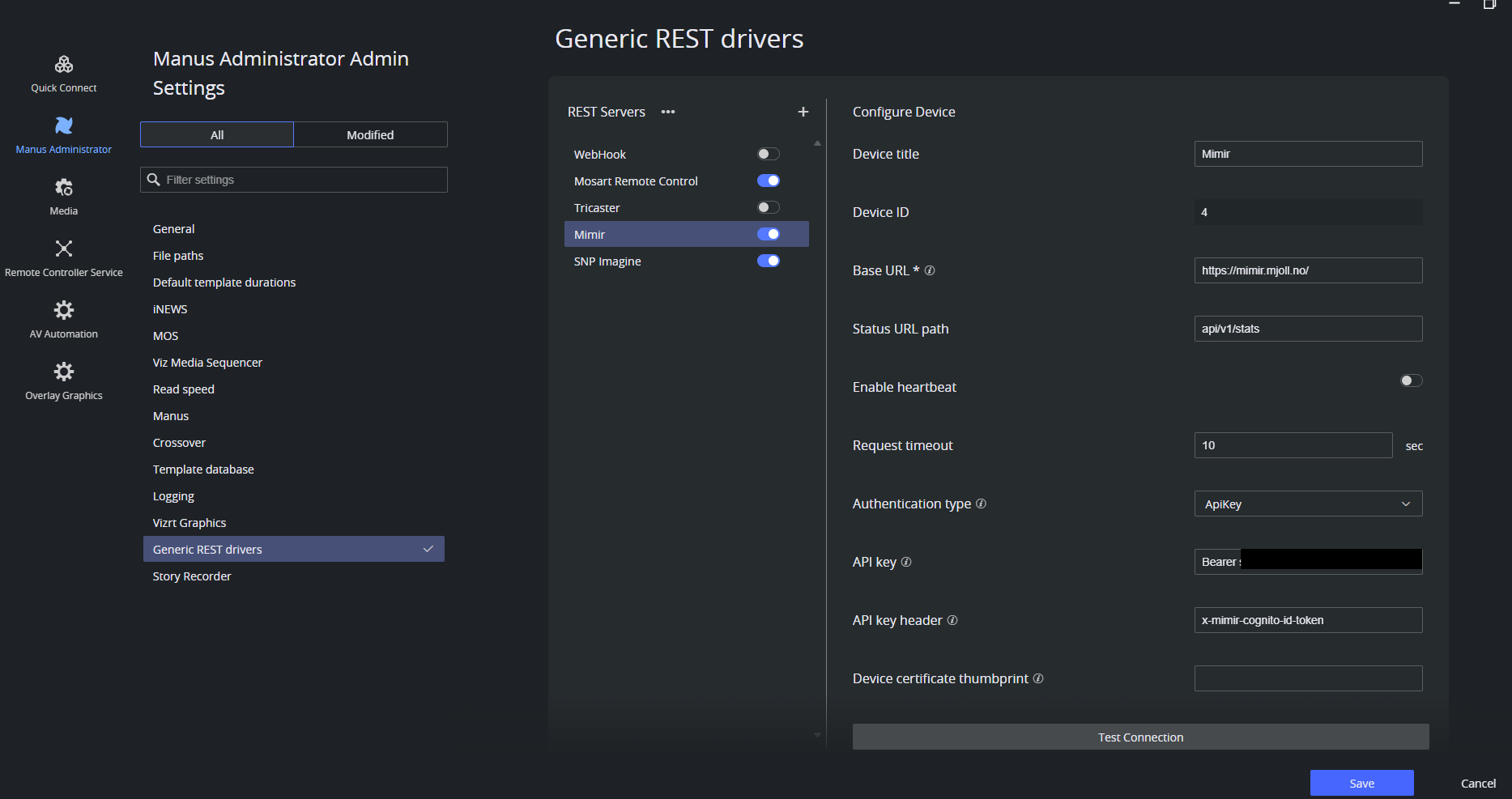
In the Manus Settings menu, configure Mimir as a Generic REST device.
In the Manus Settings menu, enable Enable Story Recorder.
Under Clip Outputs, open the Mimir section.
Select the Generic REST device configured for Mimir.
Enter the Preset ID of the render job preset from Mimir System Settings.
Enter the Kelda config ID from Mimir System Settings.
Leave Retry start delay (
30sec), Retry total duration (300sec), and Retry interval (10sec) at their defaults unless your Mimir tenant needs longer.Set Enable transcription, Transcription service, and Language code. Confirm that the language code and service pair matches a transcription configuration in the Mimir tenant settings.
Add JSON to Render request template (JSON), Create-item template (JSON), or Create-version template (JSON) only if you need to override the defaults.
Save the settings and restart the Mosart Logging Service on the Mosart Server machine.
Configure the NRCS story metadata
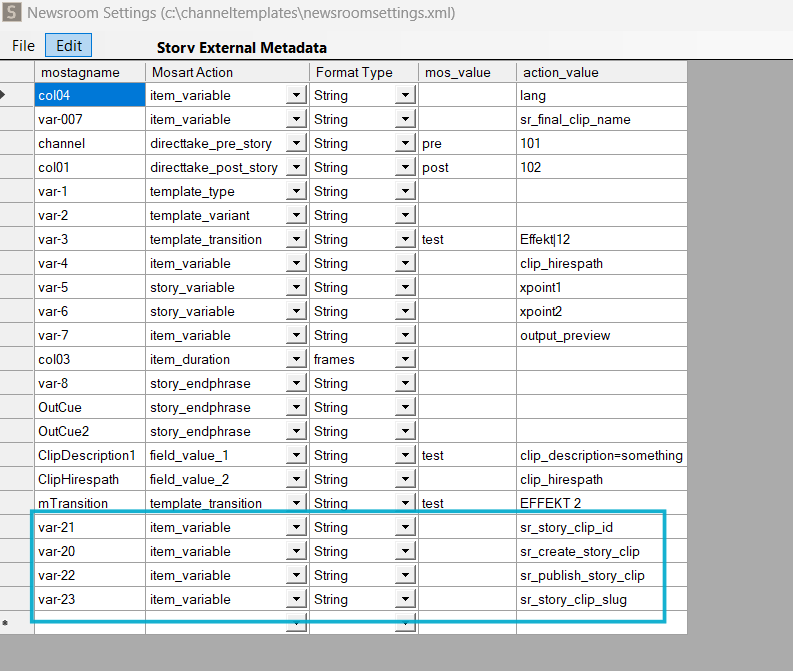
Each story that should be recorded must carry metadata that tells Viz Mosart to produce a clip. This configuration is shared by all story clip outputs, and is documented in NRCS Metadata for Story Clip Production in Story Clip Production Setup. Two paths deliver the same result: an NRCS with built-in integration (for example, Saga) sends a storyPublisher metadata block, while any other NRCS (for example, iNEWS) delivers the same fields through Newsroom Settings field mapping. The Newsroom Settings mapping for iNEWS looks like this:
Re-recording a story
When a story is re-recorded, Mimir creates a new version under the same anchor clip. Mimir (not Viz Mosart) notifies the NRCS of the updated anchor clip.
Verification
Load a rundown that has at least one story marked for recording, and check that the story items appear in the Story Recorder panel.
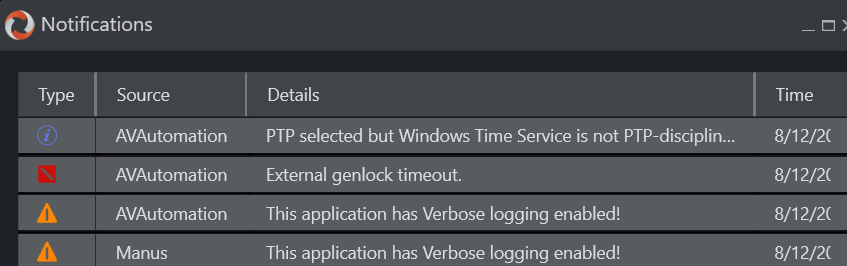
Check that the Notifications in Mosart UI shows no genlock warning. Unreliable genlock or Genlock is not enabled means Viz Mosart fell back to the internal clock, and the clips will not be frame accurate. You can still verify Story Recorder general functionality without genlock and timecode setup though.
Switch Story Recorder on in the Viz Mosart UI. The session must start without errors. Otherwise, check Story Recorder Troubleshooting.
Take the first story on air and confirm that an intermediate recording appears on the video server, named
<prefix>_<counter>_<timestamp>.<ext>(for example,SRVizrt_1_211001153956.mxf).When the story ends, confirm in Mimir that the story clip is created with the expected render profile.
If Enable transcription is on, check that Mimir produces the transcript with the configured service and language code.
Re-record the same story and confirm that Mimir adds a new version under the same anchor clip.
Operator instructions for switching on and running Story Recorder are in Working with Story Recorder.