Viz Arc Rest Service provides a Web API that allows you to trigger specific actions or control the Playlist.
The samples below assume that you have installed Viz Arc REST Service and that it's running on localhost and the REST Web API is configured to run on port 9004. The REST Web API port can be configured in the General Settings, under the Communication section.
A Swagger webapp that describes every API can be found at http://localhost:9004/swagger/.
This section contains the following examples:
Info: The samples below use curl command line tools to demonstrate usage and python to beautify the returned JSON output. Note that these tools are not required for the Web API to function correctly.
DataMap
You can set, read and delete DataMap variables through the Web API.
GET /api/v1/DataMap
Gets the list of all the key-value pairs.
curl -s -X GET http://localhost:9004/api/v1/DataMap | python -m json.tool
[ { "key": "Hello", "value": "World!" }, { "key": "WhiteListIPRanges", "value": "0.0.0.0/0" }]GET /api/v1/DataMap/{key}
Gets the key-value pair identified by the specified key.
curl -s -X GET http://localhost:9004/api/v1/DataMap/key | python -m json.tool
{ "key": "Hello", "value": "World!"}POST /api/v1/DataMap
Adds a new key-value pair or an array of them to the DataMap. The payload must be sent as JSON body. If the key already exists the value is updated.
curl -s -H 'Content-Type: application/json' -d "{ 'Key': 'Hello', 'Value': 'World!' }" -X POST http://localhost:9004/api/v1/DataMap
{ "Key": "key", "Value": "hello"}DELETE /api/v1/DataMap/{key}
Delete a key/value pair by sending a DELETE message. For example, to delete "key2" use:
curl -s -X DELETE http://localhost:9004/api/v1/DataMap/key2 | python -m json.tool
200 OKExecuter
The Executer endpoints allows you to execute a specific action either by using its name or its ID.
POST api/v1/Executer
Executes the selected action. In order to identify a specific action, the user must specify the actionId, the projectId, the profileId and the executionType.
curl -s -H 'Content-Type: application/json' -d "{ 'actionId': 'a45dbfda-d197-49ff-9995-66d3c319e1fc', 'projectId': 'gh:Sunday_Elections', 'profileId': 'Profile-1', 'executionType': 'EXECUTE' }" -X POST http://localhost:9004/api/v1/Executer
200 OKProjects
The Projects endpoint allows you to get a list of all available projects and to load a project.
Info: Viz Arc can store and read projects from two different locations: the Graphic Hub or the local file system. In order to distinguish the source of the project, the project's name is prefixed by the keywords "gh:" or "local:" (e.g. "gh:sunday_elections" or "local:sunday_elections").
Likewise, the "location" property in the responses, indicates whether the project resides on Graphic Hub (value "1") or on the file system (value "0").
GET api/v1/projects
Returns a list of all available Projects, first the projects located on the Graphic Hub, then the ones on the file system.
curl -s -X GET http://localhost:9004/api/v1/Projects | python -m json.tool
[ { "name": "gh:Animations", "lastModified": "2023-05-09T13:53:32.4633996+00:00", "location": 1, "profileIndex": 0, "tabs": [] }, { "name": "local:Skating", "lastModified": "2023-05-11T07:53:51.80198+00:00", "location": 0, "profileIndex": 0, "tabs": [] }]In the example above, two projects were found.
The name of the project is prefixed by the keywords "gh:" or "local:"; this prefix indicates whether the project is stored in the Graphic Hub or on the file system.
GET api/v1/projects/{id}
Returns the project with the specified id, if it exists. If two projects with the same name exist in the GH and the local disk, the one of the local disk will be returned first.
curl -s -X GET http://localhost:9004/api/v1/Projects/Animations | python -m json.tool
{ "name": "gh:Animations", "lastModified": "2023-05-09T13:53:32.4633996+00:00", "location": 1, "profileIndex": 0, "tabs": []}Profiles
The Profiles endpoint allows you to retrieve information about the available Profiles, Channels and Engines.
GET /api/v1/profiles
Returns the entire list of profiles available in Viz Arc.
curl -s -X GET http://localhost:9004/api/v1/profiles | python -m json.tool
[ { "name": "Local", "channels": [ { "name": "Local", "type": 1, "engines": [ { "name": "localhost" } ], "model": { "engineConfigTuple": [ { "item1": { "name": "localhost", "ipAddress": "127.0.0.1", "port": 6100, "launcherPort": 5644, "webInterfacePort": 30010, "webSocketPort": 30020, ...GET api/v1/profiles/{id | name}
Returns the profile specified by the id or name.
curl -s -X GET http://localhost:9004/api/v1/profiles/0 | python -m json.tool
{ "name": "Local", "channels": [ { "name": "Local", "type": 1, "engines": [ { "name": "localhost" } ], "model": { "engineConfigTuple": [ { "item1": { "name": "localhost", "ipAddress": "127.0.0.1", "port": 6100, "launcherPort": 5644, "webInterfacePort": 30010, "webSocketPort": 30020, ...Web Application Sample Usage
Once the Viz Arc REST service is installed, it also hosts a Web Application that uses some of the APIs described above.
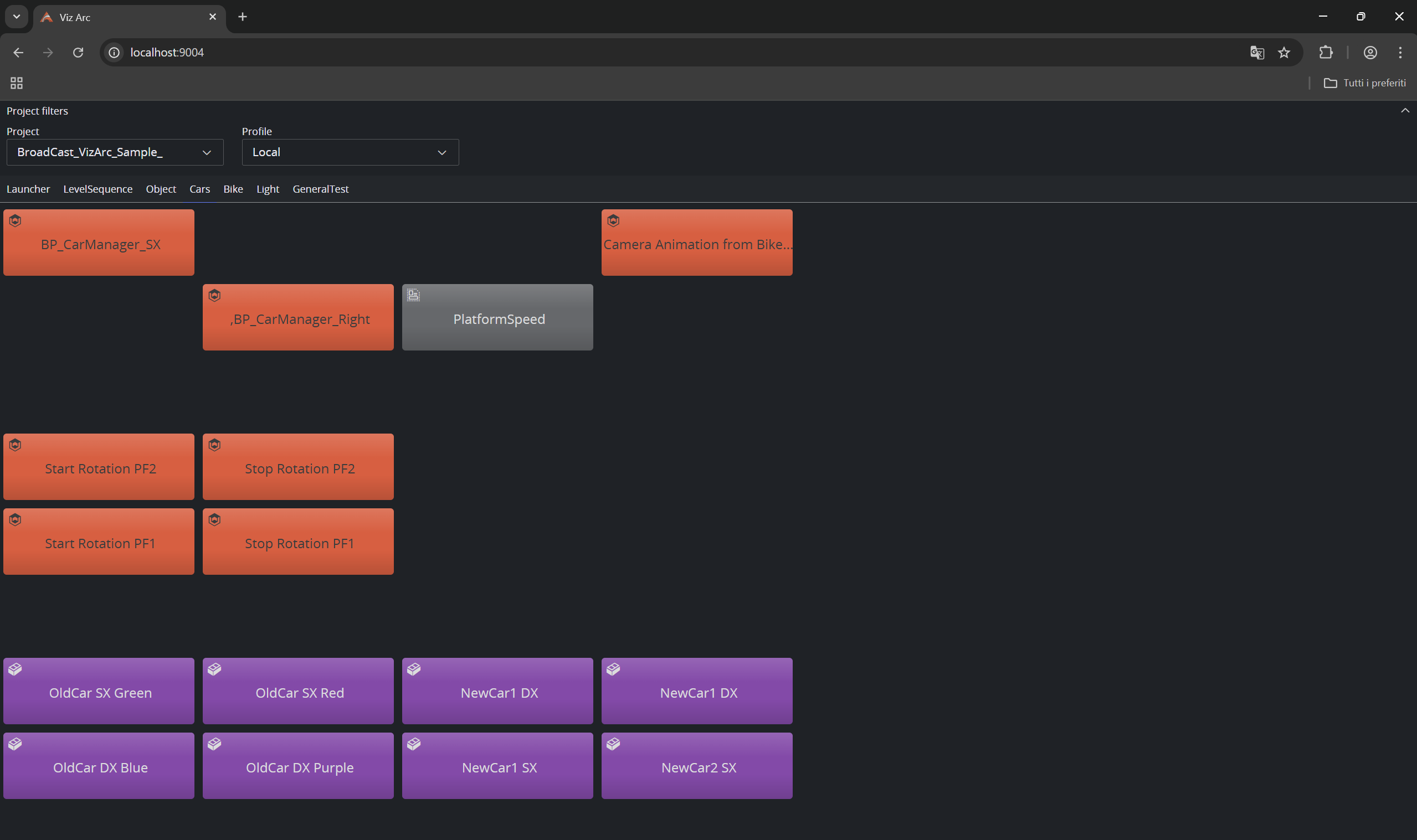
By selecting a Project and a Profile, we can see the Project's structure. By clicking on an action, Viz Arc REST Service executes it.
Keyer
The Keyer Enpoint is intended to be used to control the currently loaded precision keyer on a given output channel, through the external Loupedeck device. It allows to select a channel, restore a temporary preset and to restore the original action. It is intended to be used together with the Executer endpoint.
select
POST api/v1/Keyer/select
Selects the active keyer on a given channel (profileId and the channel must be specified on the POST call). When the parameter execute is true (its default value), the action is executed as well, thus sending the keyer values on the engine.
curl -s -H 'Content-Type: application/json' -d "{ 'profileId': 'Profile-1', 'channel' : 'cam1', 'execute' : false }" -X POST http://localhost:9004/api/v1/Keyer/select
When a Loupedeck device is connected, it shows the current keyer values of the selected channel.
{ "profileId" : "Profile-1", "channel" : "cam1", "execute" : false}Select the last loaded keyer that was executed on Profile-1, on channel cam1. If case no action has been previously loaded through the Executer endpoint, this call returns with BadRequest.
save
The save endpoint allows to save a temporary keyer setting on the REST server. Please note that the temporary settings are going to be lost after a REST server restart. The temporary settings are associated to the profile and channel, so each combination of profile and channel can potentially have one temporary “preset”.
curl -s -H 'Content-Type: application/json' -d "{ 'profileId': 'Profile-1', 'channel' : 'cam1' }" -X POST http://localhost:9004/api/v1/Keyer/save
{ "profileId" : "Profile-1", "channel" : "cam1",}Makes a copy of the current keyer loaded on profile Profile-1 and channel cam1. It is stored as a temporary preset and can be recalled through the restoreTemp preset.
restoreTemp
Restores the previously stored keyer preset, loads it on the respective output engine and loads it on the external control device (for example, Loupedeck).
curl -s -H 'Content-Type: application/json' -d "{ 'profileId': 'Profile-1', 'channel' : 'cam1' }" -X POST http://localhost:9004/api/v1/Keyer/restoreTemp
{ "profileId" : "Profile-1", "channel" : "cam1",}Restores the temporarily saved keyer preset loaded on profile Profile-1 and channel cam1.
restoreOriginal
Restores the original keyer preset, loads it on the respective output engine, and loads it on the external control device (for example, Loupedeck). The original preset is the action that was executed via the Executer endpoint.
curl -s -H 'Content-Type: application/json' -d "{ 'profileId': 'Profile-1', 'channel' : 'cam1' }" -X POST http://localhost:9004/api/v1/Keyer/restoreOriginal
{ "profileId" : "Profile-1", "channel" : "cam1",}Restores the original keyer preset loaded on profile Profile-1 and channel cam1.
clear
Clears the current keyer selection. Connected control surfaces are notified and release the keyer.
curl -s http://localhost:9004/api/v1/Keyer/clear
status
Returns the status of the currently loaded keyer. It returns whether the keyer has been modified compared to the original keyer that was executed through the Executer endpoint.
curl -s -H 'Content-Type: application/json' -d "{ 'profileId': 'Profile-1', 'channel' : 'cam1' }" -X POST http://localhost:9004/api/v1/Keyer/status
{ "profileId" : "Profile-1", "channel" : "cam1",}Checks the status of the keyer preset loaded on profile Profile-1 and channel cam1. The response to the request looks as follows:
{ success = true, reason = "", modified = true,}success is true when a comparison was able to be processed.
reason is empty on success, otherwise it contains an error message.
modified is true when the current keyer settings are different from the original keyer settings.
Templates
These endpoints let the REST service open and drive Viz Arc templates without the Viz Arc application running. Every opened template becomes an instance identified by a UUID; see the Templates page for an overview and the built-in web application at <http://<host>>:9004/templates.
POST /api/v1/Templates/open
Opens a template from Graphic Hub by file reference – the JSON file object as delivered by the Graphic Hub browsing of the Viz Arc web interface (title plus parent-folder link). Integrations that know the template by path or UUID use openByPath instead; the response of both endpoints is identical.
The response is an action-shaped JSON document. The most important fields:
uuid– the instance UUID; pass it to all subsequent Templates calls.name– the template name.thumbnailUri– link to the template's thumbnail image on Graphic Hub.scriptingModel.savedParamModels– the complete parameter structure of the template. This is a tree: panel and tab parameters carry their nested parameters inchildrenModels.scriptingModel.templateType– the template's engine family:1Viz,2Unreal,3Flowics,4Independent.scriptingModel.controlObjectLinks– map of parameter name to the Control Object ID it is linked to in the template editor.
{ "uuid": "8b6c1f0a-3d2e-4f5a-9c7b-1e2d3f4a5b6c", "name": "LowerThird", "type": "VIZ_TEMPLATE", "actionType": "TEMPLATE", "thumbnailUri": "http://ghserver:19398/thumbnails/...", "scriptingModel": { "savedParamModels": [ ... ], "templateType": 1, "controlObjectLinks": { "headline": "01" }, ... }}200 OK – returns 400 Bad Request for a missing or incomplete file reference, 404 Not Found when the folder or file does not exist or the file is not a Viz Arc template, and 504 Gateway Timeout when Graphic Hub does not answer within 30 seconds.
POST /api/v1/Templates/openByPath
Opens a template by Graphic Hub UUID or path – the endpoint of choice for external integrations.
{ "ghPath": "VizArc/templates/News/LowerThird", "uuid": "1a2b3c4d-5e6f-7a8b-9c0d-1e2f3a4b5c6d", "vdfPayload": "<payload xmlns=\"http://www.vizrt.com/types\">...</payload>", "previousInstanceUuid": "8b6c1f0a-3d2e-4f5a-9c7b-1e2d3f4a5b6c"}ghPath(required) – the full Graphic Hub path of the template file, folder path plus file name.uuid(optional) – the Graphic Hub file UUID. When given it is used for a fast direct lookup, withghPathas fallback; sending both makes the call robust against templates being moved.vdfPayload(optional) – a VDF payload document (as produced bygeneratePayloador a newsroom system). Its values are applied to the template's Control Objects, synced back onto the parameters – so the returned parameter structure already reflects the payload – and the script'sOnSetPayloadcallback is invoked. This reopens a previously generated payload for editing.previousInstanceUuid(optional) – instance to close in the same call. Single-editor clients pass the UUID of the template they had open, keeping exactly one instance alive while switching templates.
curl -s -X POST http://localhost:9004/api/v1/Templates/openByPath -H "Content-Type: application/json" -d '{ "ghPath": "VizArc/templates/News/LowerThird" }'
200 OK with the same action document as open – returns 400 Bad Request when ghPath is missing, 404 Not Found when the template cannot be found, and 504 Gateway Timeout when Graphic Hub does not answer within 30 seconds.
POST /api/v1/Templates/close
Closes an instance: stops its script engine and releases all resources. Always call this when the client is done with a template – open instances otherwise live until the service is restarted.
curl -s -X POST http://localhost:9004/api/v1/Templates/close -H "Content-Type: application/json" -d '{ "instanceUuid": "8b6c1f0a-3d2e-4f5a-9c7b-1e2d3f4a5b6c" }'
200 OK – the response returns immediately while the engine is disposed in the background; closing an already-closed instance is harmless. Returns 400 Bad Request for a missing or malformed UUID.
POST /api/v1/Templates/execute
Executes a template to an output profile. All template types are supported – Viz, Unreal, Flowics and Independent – and the execution goes through the same pipeline as in the Viz Arc application, including the script callbacks (OnExecute, OnContinue, OnUpdate, OnOut), which fire before the engine commands are sent.
Two modes are available:
Instance mode – execute an already-opened instance:
{ "instanceUuid": "8b6c1f0a-3d2e-4f5a-9c7b-1e2d3f4a5b6c", "profileName": "Studio A", "executionType": "EXECUTE", "paramValues": { "headline": "Breaking News" }}executionType–EXECUTE(default),CONTINUE,OUTorUPDATE; case-insensitive.profileName– one of the names fromGET /api/v1/profiles(see the Profiles section). The template is routed to the profile's program channel matching its engine type (Viz, Unreal or Flowics). Independent templates run without a profile –profileNamecan be omitted for them.paramValues(optional) – flat name→value map applied to the template before execution. Triplet parameters are sent as three sub-fieldsname.x/name.y/name.z.
One-shot mode – open, fill and execute in a single call by supplying a <vizarc-template> document (the format produced by the web interface's Copy XML function) instead of an instance UUID:
{ "profileName": "Studio A", "executionType": "EXECUTE", "xml": "<vizarc-template> <ghPath>VizArc/templates/News/LowerThird</ghPath> <ghFileUuid>1a2b3c4d-5e6f-7a8b-9c0d-1e2f3a4b5c6d</ghFileUuid> <template-data> <field name=\"headline\"><value>Breaking News</value></field> </template-data></vizarc-template>"}The template is located by ghFileUuid (preferred) or ghPath – at least one must be present – its values are filled from the template-data fields, and it is executed. The instance created this way stays open and its UUID is returned, so a one-shot EXECUTE can be followed by instance-mode CONTINUE / OUT calls and a final close.
curl -s -X POST http://localhost:9004/api/v1/Templates/execute -H "Content-Type: application/json" -d '{ "instanceUuid": "8b6c1f0a-3d2e-4f5a-9c7b-1e2d3f4a5b6c", "profileName": "Studio A", "executionType": "EXECUTE" }'
{ "success": true, "instanceUuid": "8b6c1f0a-3d2e-4f5a-9c7b-1e2d3f4a5b6c", "executionType": "EXECUTE" }200 OK – returns 400 Bad Request when neither instanceUuid nor xml is given, when profileName is missing for a non-independent template, or when the profile has no program channel for the template's engine type; 404 Not Found for an unknown instance, profile or template; 504 Gateway Timeout when Graphic Hub does not answer within 30 seconds.
POST /api/v1/Templates/generatePayload
Generates a VDF payload and a MOS entry for the instance's current values – the standard way to hand a filled template to a newsroom system for scheduled playout.
{ "instanceUuid": "8b6c1f0a-3d2e-4f5a-9c7b-1e2d3f4a5b6c", "paramValues": { "headline": "Breaking News" }, "payloadLabel": "Breaking News – 20:00"}The supplied paramValues (same flat format as in execute) are applied first, linked parameters are propagated onto their Control Objects – including values the script has set via SetControlObject – and the payload is built from the result:
{ "vdfPayload": "<payload xmlns=\"http://www.vizrt.com/types\">...</payload>", "mosXml": "<atom:entry xmlns:atom=\"http://www.w3.org/2005/Atom\">...</atom:entry>", "scriptFields": { "Main.rotation": "0 -77.02 0", "Main.rotation.x": "0", ... }}vdfPayload– the VDF payload document with the template's current values. It can be stored and later passed back toopenByPath(vdfPayloadfield) to reopen the filled template for editing.mosXml– a ready-to-use MOS Atom entry: thepayloadLabelas title, links to the template's thumbnail and its MSE template, and the VDF payload as content. This is the element to insert into a newsroom / MSE playlist. It isnullwhen the template has no MSE model to reference.scriptFields– flat map of Control Object values that were set from script code, for hosting applications that build their payloads from a field map instead of usingmosXmldirectly. Triplet values appear both as one space-separated value and as.x/.y/.zsub-fields. It isnullwhen the script sets no Control Objects.
200 OK – returns 400 Bad Request for a missing or malformed instance UUID, 404 Not Found for an unknown instance and 504 Gateway Timeout when the payload cannot be assembled within 30 seconds, for example while an asset reference cannot be resolved.
Timeouts
All operations that read from Graphic Hub (open, openByPath, execute, generatePayload) are bounded by a 30-second timeout and return 504 Gateway Timeout if Graphic Hub does not answer in time, so a slow or unreachable Graphic Hub never blocks the service and clients can retry safely.