This page describes how to produce a clean feed alongside the dirty (program) feed with Adaptive Live Producer (ALP).
Clean feed is the program picture without overlay graphics. It can already contain composited live sources, presets, DVE boxes and fullscreen graphics; a clean feed is not the same as no graphics. Clean is the absence of the overlay graphics that produce the dirty feed. Clean feeds are typically used for distribution, archiving, and downstream regionalization where overlays are later added.
Dirty (program) feed is the clean picture with overlay graphics (branding, name straps, lower thirds) added on top. It is the main program feed sent to air.
Clean and Dirty workflows in ALP
Clean and dirty output is produced with two Viz Engine instances:
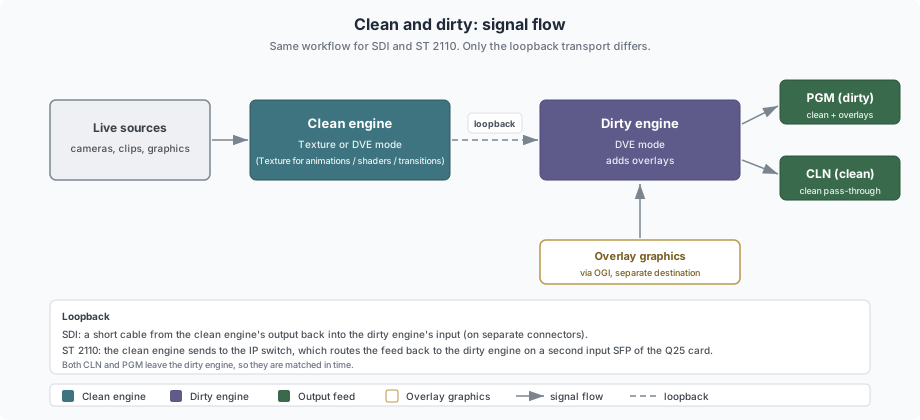
The clean engine renders the clean program (live sources, presets, DVE boxes, fullscreen graphics and transitions).
Its output is looped back into the dirty engine.
The dirty engine adds the overlay graphics and outputs both the clean (CLN) and dirty (PGM) feeds.
Info: The two engine instances can run on the same machine or on two separate engine machines. Both options work the same way.
Because both the CLN and PGM feeds are produced by the dirty engine, they stay matched in time. A single engine cannot produce a clean feed (with graphics) and a dirty feed at the same time, which is why two engines are used.
Engine Setup
The same workflow is used for SDI and ST 2110:
Clean engine. Renders the clean program and sends its output to the loopback. Runs in Texture mode when the clean program needs animations, shaders or custom transitions; runs in DVE mode for more frame stability when those are not required. DVE is more guaranteed to deliver every frame, Texture is less certain if the Matrox board is heavily loaded. DVE has lower in-to-out delay (3 frames).
Dirty engine. Runs in DVE mode. Takes the looped-back clean feed on one input, adds the overlay graphics, and outputs the CLN and PGM feeds in sync from its Matrox clean and program outputs.
SDI
Use an X.mio board. The board model depends on the number of sources and performance required.
Loop the clean engine's output back into the dirty engine's input over a cable. The clean engine output and the dirty engine input must be on separate connectors.
ST 2110
Use a Matrox X.mio5 Q25 board (two SFP pairs). An IP switch will not return a signal on the SFP pair it was sent from, so the clean feed must be received on the second SFP pair. On the card, connectors 1 to 16 are on the first SFP pair and 17 to 32 on the second. Keep the clean engine output and the dirty engine input in separate ranges (one in 1 to 16, the other in 17 to 32).
This setup needs the Q25 variant for its two SFP pairs. Use the X.mio5 Q25 when the dirty engine runs in DVE mode (the standard setup). The DSX.le5 Q25 does not support DVE, so use it only when the dirty engine runs in Texture mode.Both engines can subscribe to the same multicast for shared sources, so a shared source costs no extra bandwidth.
NDI
ALP supports NDI, but not in this clean and dirty loopback configuration. Use SDI or ST 2110 for clean and dirty output.
Info: Supported video format
HD (1080i / 1080p). This setup is not sized for UHD. At UHD, each video signal is about four times the data of HD, and the Matrox card's I/O bandwidth and the engine's compositor performance are likely to be exceeded by the dual-engine and clean-feed output combination.
Each engine uses its own input connectors (inputs are not shared between the two engines).
Overlay Graphics
Overlay graphics are handled the standard way, through the Overlay Graphics Interface (OGI) in Viz Mosart, and are taken on the dirty engine on a separate destination, not on the superchannels.
Info: An exception is an overlay that must be part of the clean feed.
Always place this one on a superchannel in the mixer on the clean engine (a superchannel reserved for overlays), so it is composited into the clean output.
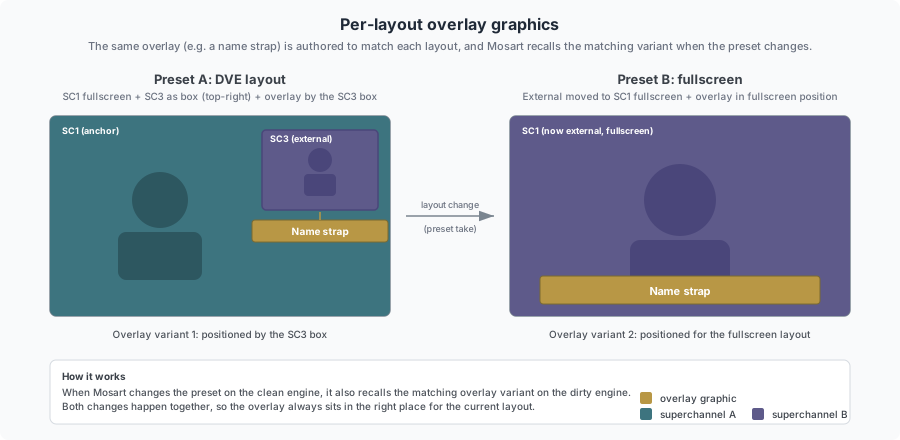
Author one overlay graphic scene (or a variant inside a scene) for each layout and position. An overlay can sit by a box in one layout and move to the fullscreen position in the next; a matching overlay scene is created for each case. Mosart recalls the matching overlay whenever the layout (preset) changes on the clean engine, so the overlay and the layout change together.
Example
A DVE preset has SC1 fullscreen and SC2 and SC3 as boxes. To label the source in the SC3 box, take an overlay designed for the SC3 box position.
Take a fullscreen preset where the SC3 source moves to fullscreen on SC1. Recall a different overlay, designed for the fullscreen position.
Both overlays are taken through OGI as usual; Mosart recalls the matching overlay when the layout changes.