Viz Engine receives and plays out audio through the video board, as embedded or AES/EBU audio. It can also play its audio mix through any audio playback device installed in Windows, such as a sound card.
This page contains information on the following topics:
Channels
Audio Channels
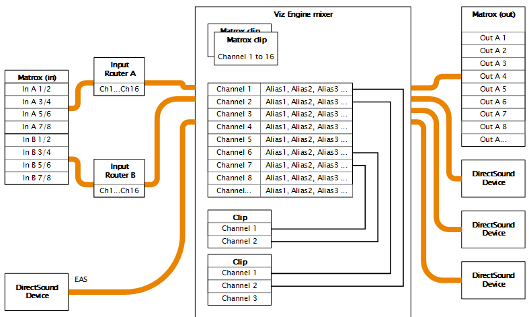
Viz Engine handles up to 16 audio channels for both input and output. This corresponds to the maximum number of embedded audio channels on an HD-SDI video source. Every channel can be given one or more user-defined aliases.
Matrox Input Channels
If using Matrox video hardware, the 16 input channels are available as AES/EBU input or embedded audio.
Output Channels
After mixing, the Viz Engine writes the audio data to the available output devices.
Note: Matrox are only able to output digital audio.
Matrox Routing
Matrox Live Input Routing
On Matrox cards, it is possible to route live input channels to any internal Viz Engine output channel. Several channels can be routed to a single internal channel, but it is not possible to duplicate input channels.
Matrox Clip Routing
Audio from Matrox clips are mapped one by one to the internal Viz Engine channels; hence, no routing is possible. Audio from audio clips played through the stage is routed to the internal audio channel. This can be done automatic or manually.
Audio Clip Formats
Viz Engine decodes audio clips with its built-in decoder. The supported formats are:
WAV
MP3
Ogg Vorbis
Codecs and DirectShow filters installed in Windows are not used, so installing them does not add support for other formats. Convert other audio formats to one of the formats above before you import them. Clips are converted to 48 kHz when they are decoded.
Audio in video clips is decoded by the clip player. See VML Clip Player.
Sound Card Output
Viz Engine can play its audio mix through any playback device that Windows reports, such as a sound card, a USB audio interface, or the HDMI or DisplayPort audio of a monitor. Sound card output uses the standard Windows audio system through the built-in MiniAudio library. It does not require DirectX or DirectSound.
Sound card output is intended for audio monitoring. Use it:
on a laptop or workstation without a video board, for example when designing scenes in Viz Artist
to monitor the audio locally
when analog audio is needed.
Note: Matrox boards only output digital audio (embedded or AES/EBU).
To choose which device each channel plays on, see Device Recognition and Selection.
Timing
When a video board is installed, the video timing of the board drives the audio mix, and the sound card plays the same mix. Without a video board, Viz Engine paces the audio mix with the system clock at 48 kHz.
Audio Input for Emergency Alerts
The only audio Viz Engine records from a Windows recording device is alert audio for the Emergency Alert System (EAS). See Emergency Alert System. Use the video board inputs for all other live audio.
See Also