Viz Engine can play audio through any playback device that Windows reports, such as a sound card, a USB audio interface or HDMI audio. Each of the internal audio channels 0 to 7 can be assigned to a playback device, and several channels can share one device.
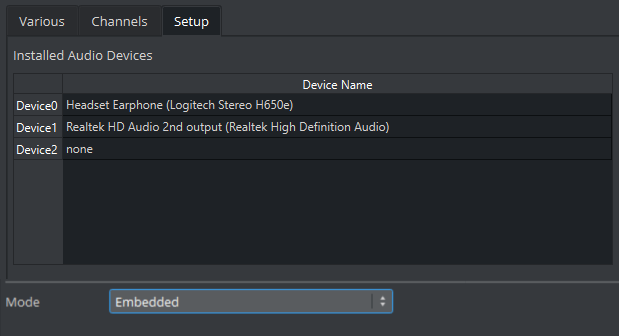
The audio system is able to use any installed DirectSound capable audio device. On every device, up to 16 channels can be used.
Mode: Refers to the audio mode of the Matrox board. Options are:
Embedded: Captures audio from the Live video input connectors and is made available to the Viz Engine audio mixer, to mix it with other audio sources. Then output as embedded audio on the live video output connectors.
AES: Captutes audio from the AES input connectors and is made available to the Viz Engine audio mixer, to mix it with other audio sources. Then output on the AES output connectors.
Embedded -> AES: Captures embedded audio from the live video input connectors and is made available to the Viz Engine audio mixer, to mix it with other audio sources. Then output on the AES output connectors.
AES -> Embedded: Captures audio from the AES input connectors and is made available to the Viz Engine audio mixer, to mix it with other audio sources. Then output as embedded audio on the live video output connectors.
Loop: Loops audio through. No audio is mixed.
Default: Captures audio, but no output on the Matrox card.
During the startup process Viz Engine tests all available audio cards installed on the system. Manual activation of audio devices is done in SECTION AUDIO_CONFIG of the Viz Config file. By default a one to one channel assignment from the first audio device is done when a new device is selected.
Device Recognition
At startup, Viz Engine lists the playback devices that Windows reports and writes each device name to the console. The names are also listed in SECTION AUDIO_CONFIG of the Viz Config file as Available0, Available1 and so on. This list is for reference only. Viz Engine builds it again at every startup, so editing it has no effect.
Device Selection
Each internal channel is assigned to a device by name with the VIZChannelDevice0 to VIZChannelDevice7 settings in SECTION AUDIO_CONFIG of the Viz Config file. Enter the device name exactly as it appears in the Available list:
VIZChannelDevice0 = Speakers (Realtek(R) Audio)VIZChannelDevice1 = Speakers (Realtek(R) Audio)A channel set to
none, or with no device, is assigned the Windows default playback device at startup. The default device is set under Sound in the Windows settings.If the configured device is not present at startup, the channel plays on the Windows default playback device instead, and Viz Engine writes a warning to the console.
If a device is disconnected while Viz Engine is running, the channels assigned to it go silent. Viz Engine reconnects to the same device automatically when it is available again. It never moves these channels to a different device.
Note: Only VIZChannelDevice0 to VIZChannelDevice7 are evaluated for sound card output.
See Also