Slot/Card Installation

Default Hardware
Single CPU 16-Cores AMD EPYC 9124 3GHz
Dual Redundant Power Supplies, hot swap (220V ONLY! 1800W C13 connector)
PCIe Gen4 + Gen5 Slots
6 PCIe Slots + 2 Slots for Double Wide GPU
64GB DDR5 (4x 16GB) up to 12x 16GB
2x 920GB U.2 Front Mount Hot Swap
4x Gbit RJ45 onboard in OCP Slot
OS Support:
Windows 10 LTSC 2021
Windows 11 LTSC 2024
Windows Server 2022
Windows Server 2025
VMWare ESXi
GPU Support:
Nvidia Ampere: RTX A2000, RTX A4000, RTX A5000, RTX A6000
Nvidia Ada: RTX 2000 Ada, RTX 4000 Ada, RTX 5000 Ada, RTX 6000 Ada
Nvidia Blackwell: RTX PRO 2000 Blackwell, RTX PRO 4000 Blackwell, RTX PRO 5000 Blackwell, RTX PRO 6000 Blackwell Max-Q (300W)
Virtualized with ESXi:
Nvidia A40, RTX A6000, RTX 6000 Ada
Matrox Support: XMIO5, DSXLE5, M264
Slot Configuration
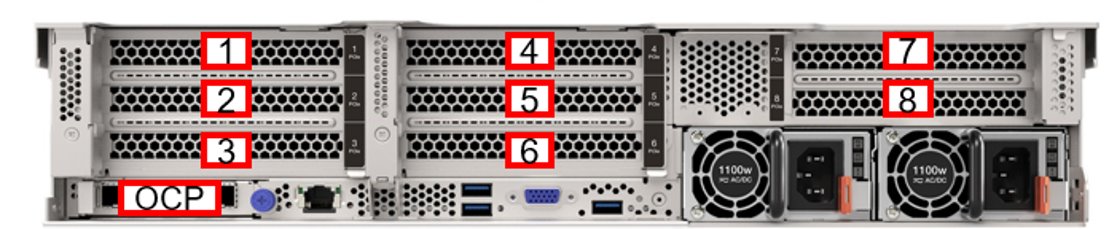
Slot | Usage |
|---|---|
Slot 1 | Unused or used by Dual Slot GPU |
Slot 2 Gen5 x16 | First Graphics Card (with Monitor) |
Slot 3 Gen4 x16 | Raid Controller |
Slot 4 | Unused or used by Dual Slot GPU |
Slot 5 Gen5 x16 | Second Graphics Card (no Monitor) |
Slot 6 Gen4 x16 | Other Expansion Card (Serial, GPI) |
Slot 7 Gen5 x16 | Matrox Video Card (X.mio5), Matrox M264 or other Expansion Card (Serial, GPI) |
Slot 8 Gen4 x16 | Matrox Video Card (X.mio3, DSX LE4), Matrox M264 or other Expansion Card (Serial, GPI) |
Bios Settings
System Settings / Devices and I/O Ports
Active Video: Add-in Device
System Settings / Enable/Disable Onboard Devices
Onboard Video: Disabled
System Settings / Operating Modes
Choose Operating Mode: Maximum Performance
System Settings / Power
PCIe Power Brake: Disabled