This section covers the following topics:
Launcher
The Pilot Data Server Launcher is a minimal dashboard to start and stop services, and offers a UI to configure the system.
Status Panel
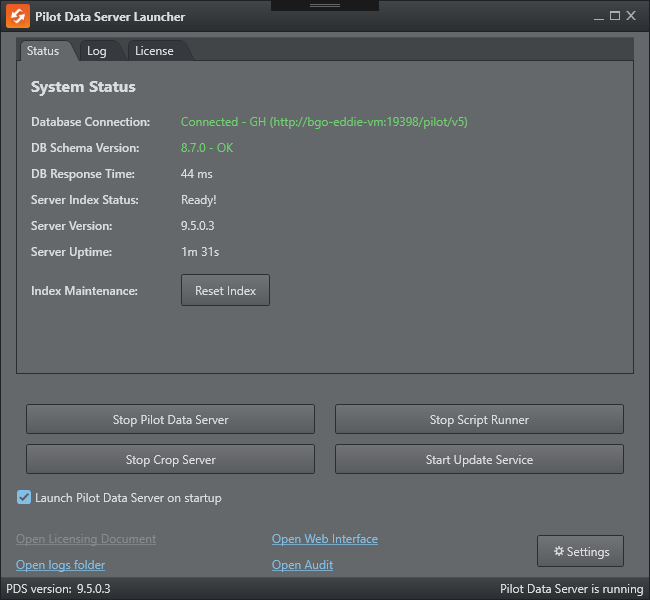
The Status panel provides an overview of the current Pilot Data Server state. The information shown is not taken from a single authoritative status source. Instead, it is derived from two runtime signals: the launcher continuously monitors the server log to infer index-building progress, and it periodically queries the /service/health endpoint to retrieve health information such as database connectivity, schema compatibility, server version, and uptime. Because these values are gathered asynchronously and from different sources, the panel should be understood as an operational summary for troubleshooting and monitoring, not as a strict real-time guarantee of internal service state.
In addition, the following functions are available:
Settings: Opens the settings window, with the main configuration topics:
Start/Stop: Start and stop services.
Launch Pilot Data Server on startup: Guarantees the Pilot Data Service and additional services are started when the computer starts.
Open Licensing Document: Opens the local documentation to configure the licenses for Pilot Data Server.
Open logs folder: Opens the logs and ini file folder, normally %ProgramData%\Vizrt\Pilot Data Server.
Open Web Interface: Opens the web page of the currently running Pilot Data Server.
Open Audit: Opens the Audit window.
Log Panel
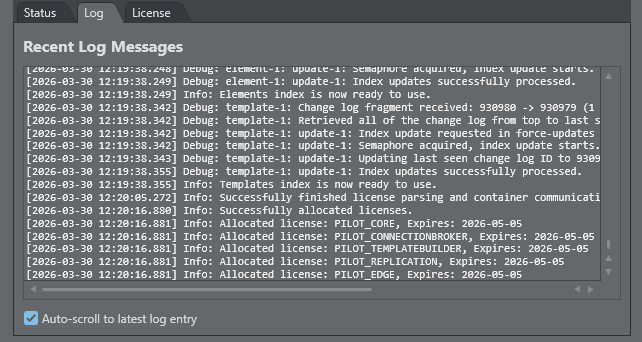
The Log panel displays a live view of recent Pilot Data Server log messages, to support troubleshooting and operational monitoring. It reads from the local server log file and shows the latest entries in chronological order, including timestamp, log level and message text. The panel is intended as a convenience view inside the launcher and only shows a limited rolling window of recent messages, not the complete log history. For a full investigation, use the Open logs folder link to inspect the original log files.
License Panel
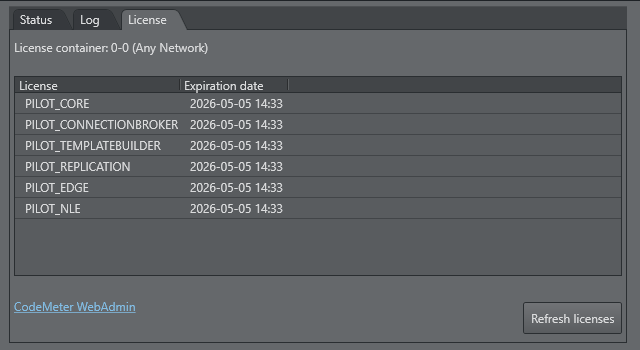
Currently activated licenses: List of the currently activated licenses on the license server/container.
CodeMeter WebAdmin: Opens Wibu license administration in a browser, and requires the Codemeter service to run.
Refresh licenses: Reconnects to the license system and does another attempt to fetch the current licenses.
Note: The Codemeter.exe service of the Wibu Licensing system, must be running in order to start Pilot Data Server.