Configuring Script Runner
Script Runner is Viz Pilot’s update service that lets you update template data, such as stock values and player statistics, right before going on air.
Note: You can write Visual Basic In Pilot scripts to modify the data, and the scripts run on the Script Runner. It is also possible to create your own external update service. For more information, see External Update Service in the Media Sequencer Manual bundled with the software.
Use Secure Communication
Script Runner can be configured to use the SSL transport layer when communicating. Click Settings > Script Runner Service to enter the configuration UI.
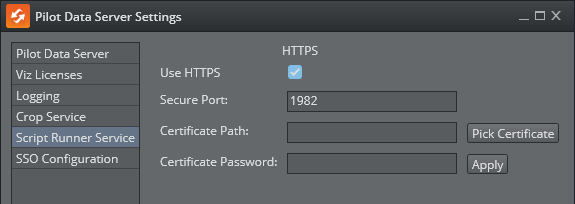
To configure Script Runner for SSL communication:
Check Use HTTPS.
The default port suggested is 1982. This can be changed, but it is recommended to use this port.
Configure a certificate by either entering a path to the *.pfx file or picking a certificate from the file system.
Enter the certificate password.
Click Apply to register the certificate information.
Click Save.
Restart the Script Runner Service.
Server Certificates and PFX Files
A server certificate, typically issued by a trusted Certificate Authority (CA), contains the server's public key and identifying information. Adding a certificate for Script Runner or Crop Service is done by importing a PFX file . PFX (Personal Information Exchange) file, also known as PKCS#12. A PFX file consolidates the server certificate, its private key, and any intermediate and root certificates into a single, secure, password-protected file.
Note: Viz Pilot and Media Sequencer with an Oracle backend, do not support Script Runner on HTTPS.
Configure the HTTP Port
The Script Runner uses port 1981 by default for HTTP. To change the port:
On the Pilot Data Server machine, open the configuration file in a text editor: %ProgramFiles%\vizrt\Data Server\PilotScriptRunnerHostService.exe.config.
Change the port by modifying the following line:
<settingname="DefaultPort"serializeAs="String"><value>1981</value></setting>Save the file.
Restart the Vizrt Script Runner service from the Windows Services window.