Graphic Hub Configuration Settings
To view the Graphic Hub configuration settings, click Graphic Hub in the Viz Trio Configuration.
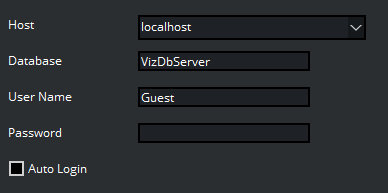
These are the configuration settings to log on to Graphic Hub. All settings are local to the specific Viz Trio client.
Host: Hostname or IP address for the Viz DB server.
Database: Name of the Graphic Hub database.
User Name: User name used for logging-in to the database.
Password: Password for logging-in to the database.
Auto Login: Enable Viz Trio to automatically log-in at startup.
Info: If the local Viz Engine’s auto-login is enabled, Auto Login here is disabled.
Scene and Library Imports
Rapid Import
Note: Rapid Import is a strictly experimental feature. It is still under development and does not yet provide full support. Be aware that some functionality may be incomplete or provide unexpected results.
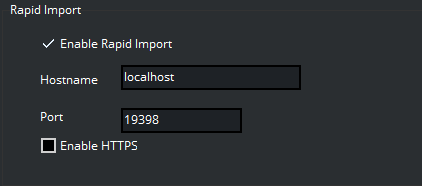
To enable scene import with Graphic Hub REST API
Add these details:
Enable Rapid Import: Enables default usage of Graphic Hub REST API Import when importing scenes. Will fallback to normal import if not possible to import with REST API.
Hostname: Sets the hostname of the Graphic Hub REST API service.
Port: Sets the Port of the Graphic Hub REST API service.
Enable HTTPS: Enables usage of HTTPS protocol in Graphic Hub REST API Import.
Image Library
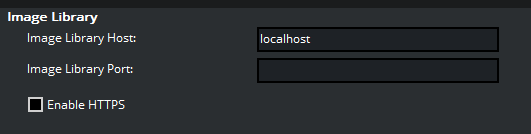
To access the Graphic Hub Image Library extension
Add these details:
Host: Hostname of the Graphic Hub Image Library REST API service.
Port: Port of the Graphic Hub Image Library REST API service.
Enable HTTPS: Enable using HTTPS protocol in Graphic Hub Image Library extension.