The Configuration Service is the web-based control panel for a running VAM installation. You use it for everything except installing VAM in the first place — managing packages, changing platform settings, running backups and checking cluster health.
When to Use the Configuration Service vs. the Installer
Task | Use this |
|---|---|
First-time install of VAM |
|
Upgrade VAM to a new version |
|
Add or remove a cluster node |
|
Install / upgrade / uninstall a package | Configuration Service |
Change platform settings (cert, OIDC) | Configuration Service |
Take or restore a backup | Configuration Service (or installer for full restores) |
Check pod / service health | Configuration Service |
Manage licenses | Configuration Service |
How to Open It
Browse to https://<your-vam-host>/config (the exact URL was shown on the installer's Finish screen). Sign in with the OIDC identity provider you configured during installation — see Signing in.
You do not need access to the installer host to use the Configuration Service; it runs inside the cluster and is reachable over the network like any other web app.
The Navigation Map
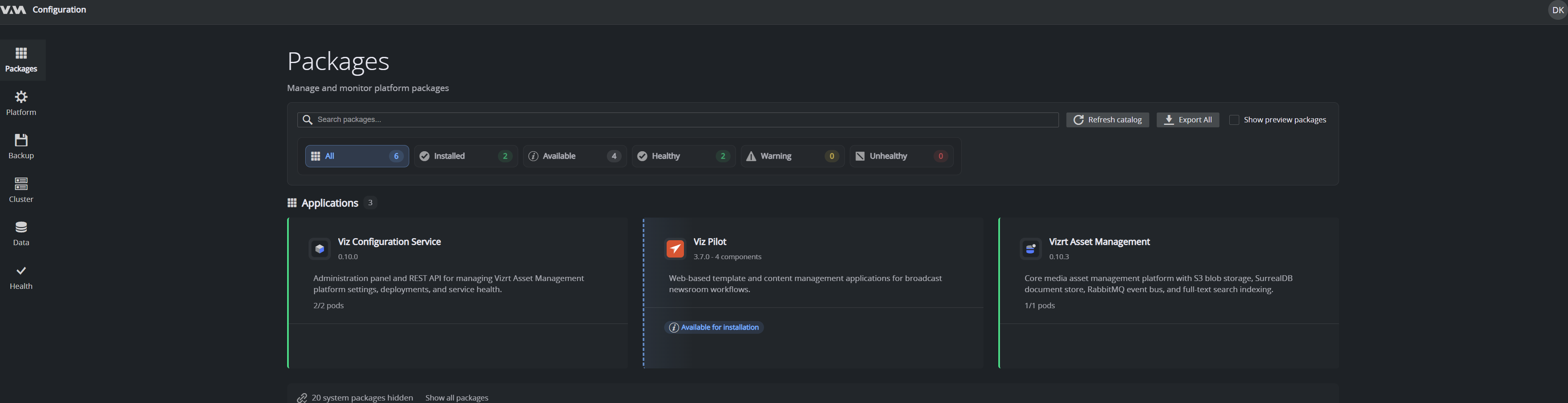
After sign-in, the left navigation has these sections:
Section | What it's for |
|---|---|
Packages | Browse, install, configure, upgrade and uninstall VAM packages. |
Platform | Authentication (OIDC), certificates (ADCS), networking, storage license, replication, advanced settings and the audit log. |
Backup | Run and schedule backups; verify and restore them. |
Cluster | Read-only view of the underlying Kubernetes cluster — pods, workloads, services, events. |
Data | Browse the platform data store (in development). |
Health | On-demand health scan of the whole installation. |
Your account menu (the avatar in the top-right) is where you sign out.
The Packages view is the steady-state workspace — most day-to-day operation happens there.
The storage license (AiStor enterprise license) lives under Platform → Storage license, not a separate top-level section.
Core Concept: Packages
Everything VAM installs is a package. The core asset-management services are packages; optional connectors and integrations are packages; sample data is a package. The Configuration Service is shaped around this:
- The catalog shows packages available to install.
- The package detail page shows a single installed package: its current version, its configuration, its lifecycle actions (upgrade, reconfigure, uninstall) and its health.
This means that to configure VAM, or to upgrade a feature, you find the relevant package and operate on it. There is no separate settings surface for individual features.
Where to Go Next
- First time signing in: Signing in.
- Day-to-day operation: Managing packages.
- After install: configure backups in Backup & restore.