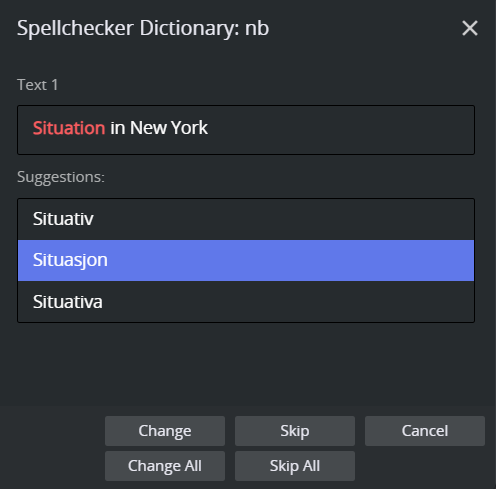
The Viz Pilot Edge payload editor, includes a built-in spell check feature allowing template scripts to check text fields for misspellings. When invoked, a dialog guides the user through each misspelled word, offering suggestions, changes or skips field by field.
Prerequisites: Dictionary Files
Spellchecker uses Hunspell dictionaries, the same format used by LibreOffice, Firefox, and many other applications. Each language requires two files with the same base name, but different extensions:
.aff: affix rules file (grammar/morphology)..dic: word list file.
Where to Obtain
LibreOffice dictionaries on GitHub: Comprehensive, actively maintained collection and organized by language code.
Hunspell dictionaries on CGIT: Original Hunspell project.
The language code in the filename must match what you pass to the spellCheck() script method (for example, en_US, nb_NO, de_DE).
Placing Dictionary Files
By default, Viz Pilot Edge looks for dictionary files in a folder named dictionaries served at the same path as the application:
dictionaries/ en_US.aff en_US.dic nb_NO.aff nb_NO.dicTo use a different location, set the environment variable vizrt-spellcheck-path to the desired base path or URL. For example:
https://cdn.example.com/pilot-dicts: Absolute URL to a remote dictionary server.
./my-dicts: Relative path on the same server.
The application fetchs {vizrt-spellcheck-path}/en_US.aff and {vizrt-spellcheck-path}/en_US.dic at runtime.
Environment Variables
Variable | Description | Default | Example |
|---|---|---|---|
| Base URL or path where .aff/.dic dictionary files are served. |
|
|
| Default language code used when none is passed to |
|
|
These environment variables can either be set in URL parameters to the Viz Pilot Edge plugin, or they can be specified in the Pilot Data Server settings, as optional parameters. For more information, see Environment Variables.
To set these environment variables in Pilot Data Server settings, follow these steps:
Open DataServerConfig (default URL http://pds-host:8177/app/DataServerConfig/DataServerConfig.html).
Click Add New Optional Parameter.
Add
env-vizrt-spellcheck-pathandenv-vizrt-spellcheck-language.
Script API
Spell check is available in template scripts via the pilot.spellCheck() method.
vizrt.spellCheck(languageCode?, fields?)Parameter | Type | Required | Description |
|---|---|---|---|
|
| No | The Hunspell language code to use, for example |
|
| No | An array of field paths to check. If omitted, all applicable plain-text fields in the template are checked. |
Return value: Promise<boolean> resolves to true when the user completes the spell check, or false if the user cancels the dialog.
Examples
Check all text fields using the default language:
const completed = await vizrt.spellCheck()Check all text fields in Norwegian:
const completed = await vizrt.spellCheck("nb_NO")Only check specific fields:
const completed = await vizrt.spellCheck("en_US", ["title", "subtitle"])Respond to cancellation:
vizrt.onBeforeSave = async () => { const result = await vizrt.spellCheck("nb") if (result) { console.info("Spell check completed, changes applied") } else { console.info("Spell check cancelled by user") } return result }Behavior
The dictionary is fetched once per language and cached for the duration of the session. Subsequent spell check invocations for the same language do not re-fetch the files.
If a dictionary fails to load, an error is shown in the dialog and the spell check cannot proceed for that language.
Only plain-text fields are spell checked. Image fields, numeric fields, and other non-text types are skipped automatically.
If an explicit list of
fieldsis provided and a field path does not correspond to a text field, it is silently ignored.The payload is only updated after the user completes the dialog. If the user cancels, no changes are applied.
Custom Dictionary
Organizations can supplement any language dictionary with a custom word list by placing a file named custom.txt in the same dictionary folder as the .aff and .dic files. When a language dictionary is loaded, the spell checker automatically attempts to fetch custom.txt from the same base path and adds any words found to the dictionary. The file is fetched once and cached for the session, and it applies to all language dictionaries loaded from the same base path.
File format: Plain UTF-8 text, one word per line.
Leading and trailing whitespace on each line is ignored.
Empty lines are ignored.
Lines beginning with # are treated as comments.
custom.txt example:
# Organization-specific terminologyVizrtMOSNRCSMosart# NamesBjørnTullevoldSigveStureguttIf custom.txt is not present, the spell checker proceeds normally with no error.