Introduction
Asset Hosting allows Viz Pilot Edge to embed a custom asset editor UI inside an <iframe>. This enables third‑party or custom web applications to act as asset guests that create, modify, or visualize assets (images and videos) used by templates.
Communication between the host (Viz Pilot Edge) and the guest (your asset UI) is done using the browser standard window.postMessage API. The host controls lifecycle and context, while the guest is responsible for presenting UI and emitting updated asset data.
The basic architecture is as follows:
The host embeds the guest using an
<iframe>.The guest reads configuration from query parameters.
Both sides exchange structured messages using
window.postMessage.
Configuration
This section describes how Asset Guests are configured to appear in Template Builder and Viz Pilot Edge.
Asset Guests are registered in Data Server Config, where each guest editor is defined and made available to the system.
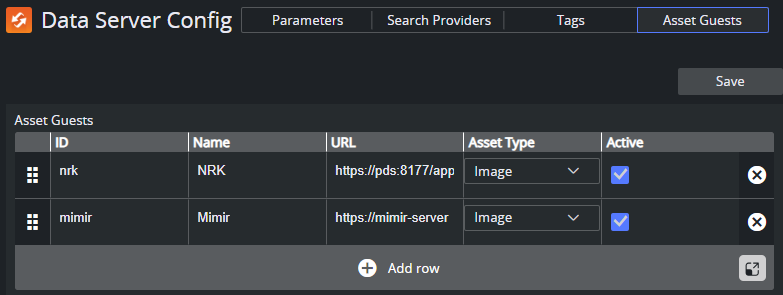
Open Data Server Config.
Navigate to the Asset Guests section.
Add one row for each Asset Guest you want to register.
ID: A unique identifier used by Viz Pilot Edge to associate assets with a specific guest editor. The value can be any unique string, but must remain stable once the assets are created using this guest.
Name: The display name of the Asset Guest. This name appears in the search and selection UI when users choose an editor.
URL: The full URL of the Asset Guest UI. Viz Pilot Edge loads this URL inside an
<iframe>when the guest editor is opened.Asset Type: The type of assets this asset guest provides, which can be an image or video.
Active: Controls whether the Asset Guest is available in Viz Pilot Edge. When disabled, the guest is not shown in the UI.
Click Save.
Asset Host API
The Asset Host API is a small, message‑based protocol over window.postMessage. Messages are JavaScript objects with a mandatory type property and optional additional fields.
The API is asymmetric:
The host drives state by sending the current asset to the guest.
The guest notifies the host when the asset has changed.
All messages sent from the guest to the host must:
Include the
guestid.Use the host origin as
targetOrigin.
Query Parameters
When loading the asset guest iframe, the host (Viz Pilot Edge) appends query parameters that the guest must read.
asset_host_origin: Specifies the origin of the host application. The guest must use this value as thetargetOriginwhen callingpostMessage.guestid: Uniquely identifies this guest instance. This value must be echoed back in all messages sent to the host.
Guest > Host Messages
asset_guest_loaded: Sent by the guest when it has finished loading and is ready to receive messages.
Example:
window.parent.postMessage( { type: "asset_guest_loaded", guestid }, hostOrigin)The purpose of this asset is to signal readiness, and allows the host to safely send set_asset.
asset_changed: Sent by the guest when the user selects an asset to be displayed in the host.
Example:
window.parent.postMessage( { type: "asset_changed", guestid, xml: "<entry xmlns=...>...</entry>" }, hostOrigin)Note: The xml must be a valid Atom <entry> representing the asset.
Example XML for Image Assets
<entry xmlns="http://www.w3.org/2005/Atom" xmlns:media="http://search.yahoo.com/mrss/"> <content type="image/jpeg" src="https://example.com/image.jpg"/> <title>Headline of the Day</title> <id>17737204</id> <updated>2026-01-21T13:40:23Z</updated> <media:content url="https://example.com/image.jpg" type="image/jpeg" width="1200" height="675"/> <media:thumbnail url="https://example.com/thumb.jpg"/></entry>Host > Guest Messages
set_asset: Sent by the host to apply an existing asset entry to the guest UI. The guest typically selects this asset (if possible) in its UI.
Example:
window.addEventListener("message", ev => { if (ev.data.type === "set_asset") { const assetXml = ev.data.xml // Update UI from asset XML }})The purpose of this asset is to initialize the guest UI, and update the guest when the selection changes externally.
Minimal Lifecycle Example
The host loads the guest iframe with query parameters.
The guest initializes and sends
asset_guest_loaded.The host sends
set_asset.The user edits the asset in the guest UI.
The guest sends
asset_changed.
Complete Example
A complete HTML/JavaScript example implementing an image asset editor using an external feed from NRK, can be used as a reference implementation:
<!DOCTYPE html><html><head><script> addEventListener('DOMContentLoaded', () => { const ATOM_NS = "http://www.w3.org/2005/Atom" function getQueryParameter(name) { const params = new URLSearchParams(window.location.search) return params.get(name) } /** * Get the host origin specified by the "asset_host_origin" query parameter. */ function getHostOrigin() { return getQueryParameter("asset_host_origin") } /** * Get the guest identifier specified by the "guestid" query parameter. */ function getGuestIdentifier() { return getQueryParameter("guestid") } /** @param {string} text */ function xmlEscape(text) { return text .replace(/&/g, "&") .replace(/</g, "<") .replace(/>/g, ">") } /** * @typedef {Object} FeedItem * @property {string} id * @property {string} title * @property {string} type * @property {string} url * @property {string} updated */ /** * Create Atom XML for an asset. * @param {FeedItem} item * @param {number} width * @param {number} height * @returns {string} */ function getXml(item, width, height) { const dims = width && height ? ` width="${width}" height="${height}"` : "" return `<entry xmlns="http://www.w3.org/2005/Atom" xmlns:media="http://search.yahoo.com/mrss/"> <title>${xmlEscape(item.title)}</title> <id>${xmlEscape(item.id)}</id> <updated>${xmlEscape(item.updated)}</updated> <content type="${xmlEscape(item.type)}" src="${xmlEscape(item.url)}" /> <media:content url="${xmlEscape(item.url)}" type="${xmlEscape(item.type)}"${dims} /> <media:thumbnail url="${xmlEscape(item.url)}" /> </entry>` } /** * Parses an Atom entry XML string into a FeedItem. * @param {string} assetXml * @returns {FeedItem | undefined} */ function getItemFromXml(assetXml) { const entryEl = new DOMParser().parseFromString(assetXml, "application/xml").documentElement const titleEls = entryEl.getElementsByTagNameNS(ATOM_NS, "title") const idEls = entryEl.getElementsByTagNameNS(ATOM_NS, "id") const updatedEls = entryEl.getElementsByTagNameNS(ATOM_NS, "updated") const contentEls = entryEl.getElementsByTagNameNS(ATOM_NS, "content") if ( titleEls.length !== 1 || idEls.length !== 1 || updatedEls.length !== 1 || contentEls.length !== 1 ) return undefined const contentEl = contentEls.item(0) const type = contentEl.getAttribute("type") const url = contentEl.getAttribute("src") const title = titleEls.item(0).textContent const id = idEls.item(0).textContent const updated = updatedEls.item(0).textContent if (!type || !url || !title || !id || !updated) return undefined return Object.freeze({ id, title, url, type, updated }) } const titleDiv = document.getElementById("title") const hostValuesDiv = document.getElementById("hostValues") /** @type {HTMLImageElement} */ const imgEl = document.getElementById("image") /** @type {HTMLSelectElement} */ const itemSelect = document.getElementById("itemsSel") const guestid = getGuestIdentifier() const hostOrigin = getHostOrigin() /** @type {FeedItem[]} */ const items = [] let selItem = undefined let pendingChangeAsset = false window.addEventListener("message", ev => { if (hostOrigin && ev.origin !== hostOrigin) return const type = ev.data?.type ?? "" switch (type) { case "set_asset": { selItem = typeof ev.data.xml === "string" ? getItemFromXml(ev.data.xml) : undefined if (items.length) { itemSelect.value = selItem?.id ?? "" } titleDiv.textContent = selItem?.title ?? "" break } case "provide_host_values": { const { type, ...rest } = ev.data hostValuesDiv.textContent = JSON.stringify(rest) break } } console.log("message from host:", ev.data) }) imgEl.addEventListener("load", () => { if (!pendingChangeAsset || !selItem) return const xml = getXml(selItem, imgEl.naturalWidth, imgEl.naturalHeight) if (hostOrigin) { window.parent.postMessage( { type: "asset_changed", guestid, xml }, hostOrigin ) } titleDiv.textContent = `${selItem.title} (${imgEl.naturalWidth}x${imgEl.naturalHeight})` pendingChangeAsset = false }) itemSelect.addEventListener("change", () => { const newValue = itemSelect.value const oldValue = selItem?.id ?? "" if (newValue === oldValue) return const newItem = items.find(item => item.id === newValue) if (newItem) { selItem = newItem imgEl.src = selItem.url pendingChangeAsset = true } }) async function initialize() { itemSelect.disabled = true let feedText = "" try { const response = await fetch("https://www.nrk.no/toppsaker.rss") if (!response.ok) throw new Error(`HTTP ${response.status}`) feedText = await response.text() } catch (err) { console.error("Failed to load feed", err) return } const feedDoc = new DOMParser().parseFromString(feedText, "application/xml") const itemEls = feedDoc.getElementsByTagName("item") for (let i = 0; i < itemEls.length; ++i) { const itemEl = itemEls.item(i) const titleEls = itemEl.getElementsByTagName("title") const idEls = itemEl.getElementsByTagName("guid") const contentEls = itemEl.getElementsByTagNameNS("http://search.yahoo.com/mrss/", "content") const dateElm = itemEl.querySelector("pubDate") if (!titleEls.length || !idEls.length || !contentEls.length || !dateElm) continue const title = titleEls.item(0).textContent const id = idEls.item(0).textContent const updated = dateElm.textContent const contentEl = contentEls.item(0) const url = contentEl.getAttribute("url") const type = contentEl.getAttribute("type") if (!title || !id || !url || type !== "image/jpeg" || !updated) continue items.push(Object.freeze({ title, id, url, type, updated })) } for (const item of items) { const opt = document.createElement("option") opt.value = item.id opt.textContent = item.title itemSelect.appendChild(opt) } itemSelect.value = selItem?.id ?? "" itemSelect.disabled = false } initialize() if (hostOrigin) { window.parent.postMessage( { type: "asset_guest_loaded", guestid }, hostOrigin ) } })</script><style> .label { padding-top: 8px; font-size: x-small; display: block; } .content { min-height: 20px; }</style></head><body style="color: white; background-color: darkslateblue;"> <h4>I am a hosted asset editor guest!</h4> <div style="font-size: smaller;"> I allow you to create an image asset from the NRK news feed. </div> <div style="padding-top: 8px; font-size: smaller"> NRK news feed items: </div> <select id="itemsSel"></select> <label class="label">Host values:</label> <div id="hostValues" class="content"></div> <label class="label">Title:</label> <div id="title" class="content"></div> <label class="label">Image:</label> <img id="image" src="" height="64" /></body></html>Best Practices
Always validate
event.originfor incoming messages.Always use
asset_host_originastargetOrigin.Treat the XML asset entry as immutable input.
Only send
asset_changedwhen the asset is complete and valid.