Viz Engine provides a Shared Memory (SHM) mechanism that allows external applications to push data into a running graphics scene in near-realtime. This is commonly used for scenarios like live financial tickers, sports scores, election results, and weather data. Anywhere a graphic must reflect rapidly changing values without re-triggering the entire element.
The ApplySharedMemory control plugin is the Viz Engine component that receives SHM data and applies it to scene containers. Each piece of data is addressed by a key, a hierarchical path such as /stocks/random/MSFT, that the plugin uses to route incoming values to the correct container in the scene tree.
How It Works End-to-End
The complete data flow for a shared memory ticker looks as follows:
External data source (for example, Vizrt Datacenter, a custom UDP/TCP application, or any SHM-capable sender) continuously pushes key-value updates into Viz Engine's shared memory.
ApplySharedMemory plugin on the scene reads those keys and maps them to scene containers.
Template Builder imports the scene and exposes the control field backed by the plugin. The field uses the special media type
application/vnd.vizrt.smmkey, which stores the SHM key string.Viz Pilot Edge (or Viz Ticker Client) lets the user select which data item to display by browsing a feed and choosing an entry. The locator element in the feed entry carries the SHM key.
At playout time, the selected key is written into the payload. Viz Engine's ApplySharedMemory plugin uses that key to look up the matching realtime data in shared memory and apply it to the graphic.
Importing a Scene with ApplySharedMemory
When importing a Viz Engine scene that uses the ApplySharedMemory control plugin, Template Builder automatically creates a field with the media type application/vnd.vizrt.smmkey. This field appears as a single-line text editor in Viz Pilot Edge, but its purpose is to hold the shared memory key path.
Linking the Field to a Feed
To let users select which data item to display (for example, which stock symbol), link the SHM key field to a feed that contains locator entries:
Select the SHM key field in the model editor.
Set the Data entry type to either:
Feed Drop-down: Presents feed entries as a drop-down list for quick selection.
Feed Browser: Presents a collection view for browsing and searching feed entries, while also allowing manual key entry.
Set the Feed URL to point to the Atom feed containing the available data items (for example, a list of stock symbols served by Pilot Data Server or a custom feed endpoint).
Set the Select from feed item to Locator. This tells the system to extract the value of the
<viz:locator>element from the selected feed entry and store it as the field value.
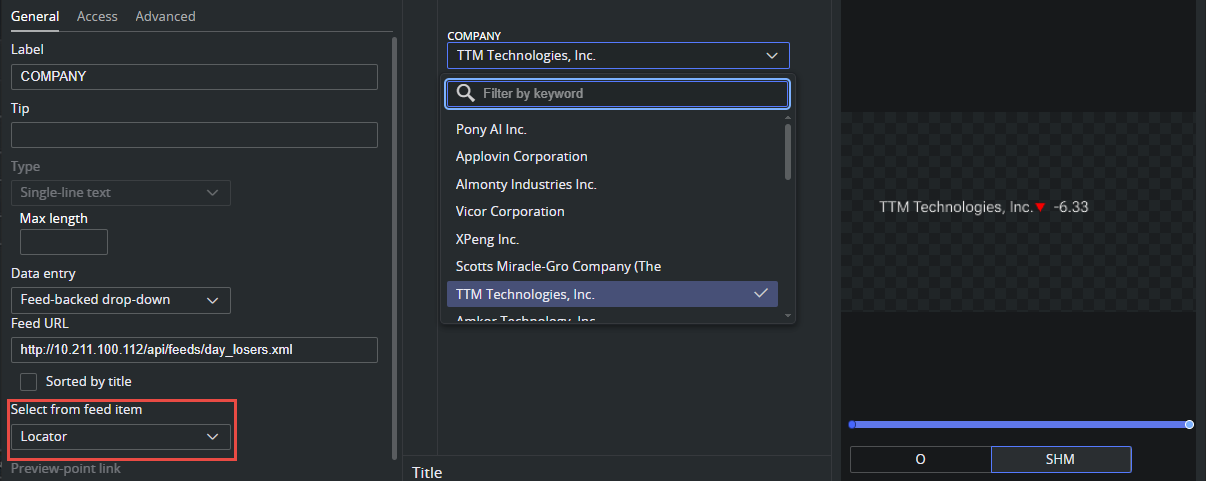
When Select from feed item is set to Locator, the system matches the type attribute of the <viz:locator> element against the field's media type (application/vnd.vizrt.smmkey). If they match, the text content of the locator element, the SHM key path, is extracted and written to the field.
Feed Entry Format
Feed entries that provide SHM key data, must include a <locator> element from the Vizrt Atom Extension namespace (http://www.vizrt.com/atom-ext). The type attribute must be application/vnd.vizrt.smmkey to indicate that the value is a shared memory key.
Example Atom Entry
<entry xmlns="http://www.w3.org/2005/Atom"> <id>MSFT</id> <published>2012-04-08T16:42:58+07:00</published> <updated>2012-09-25T10:34:29Z</updated> <title type="text">Microsoft</title> <locator type='application/vnd.vizrt.smmkey' xmlns='http://www.vizrt.com/atom-ext'>/stocks/random/MSFT </locator></entry>Element / Attribute | Description |
|---|---|
<id> | A unique identifier for the feed entry (for example, the stock ticker symbol). |
<title> | The human-readable label shown to the user in the feed browser or drop-down (for example, "Microsoft"). |
<locator> | The Vizrt Atom Extension element carrying the SHM key. |
locator/@type | Must be |
locator/@xmlns | Must be |
Locator text content | The shared memory key path (for example, |