Most Control plug-ins have a set of common properties:
Field Identifier: Used by the control client applications to identify the editable item in the scene. Only English characters (A-Z, a-z), numeric digits (0-1), dot ( . ) and dash ( - ) are allowed. When a dot is used in the identifier (for example, 1.score) it means this is a sub-field. Multi-level sub-field is allowed. When making templates for Viz Trio, this should be a numeric value, starting at 1. The numbers are used to create the tab-order between the editable items. For Viz Pilot and Viz Ticker, this can also be a descriptive text string.
Description: Describes the tab field or editable object. This is used as a description for the items when used in the control clients.
Show only in Expert Mode: Hides the tab-field properties for the user if Expert Mode is enabled in Viz Trio. For more information, read about Viz Trio’s macro commands, and the command set_expert_mode_enabled.
Shared Memory Placeholders
Some Control plug-in supports Shared Memory placeholders. Placeholders can be described by ${shm_key}, where shm_key is the name of a Global Shared Memory Map. You can also define a default value by adding a pipe and the value. For example: ${shm_key|Default}, where Default is used as default value if the Shared Memory Map is empty or does not exist.
Shared Memory maps can be accessed and changed in various ways, like an external command, script etc...
Examples
Control Text

This shows "Hello world" by default. By sending GLOBAL*MAP SET_STRING_ELEMENT test This is my new value from a shared memory the text changes to the new value.
Control Image
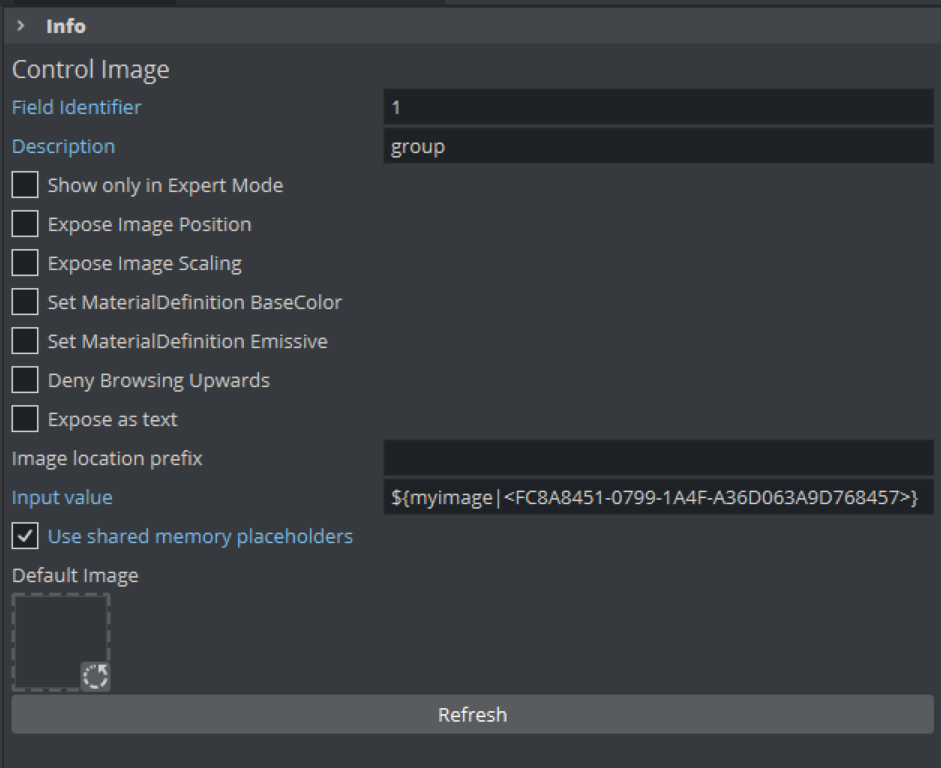
This show loads a certain image one the shared memory variable myimage has been changed. Otherwise, it falls back to the given default image. By sending GLOBAL*MAP SET_STRING_ELEMENT myimage <any_uuid> the text changes to the new value.
When using the image location prefix, be sure to have the value set correctly (for example, IMAGE*/Vizrt-Quality_Assurance/Engine/Standard_Library/ControlImage/).
You can then invoke a change of the SHM variable by sending, for example GLOBAL*MAP SET_STRING_ELEMENT myimage testimage. This forces the image /Vizrt-Quality_Assurance/Engine/Standard_Library/ControlImage/testimage to be loaded and set.
Control Parameter
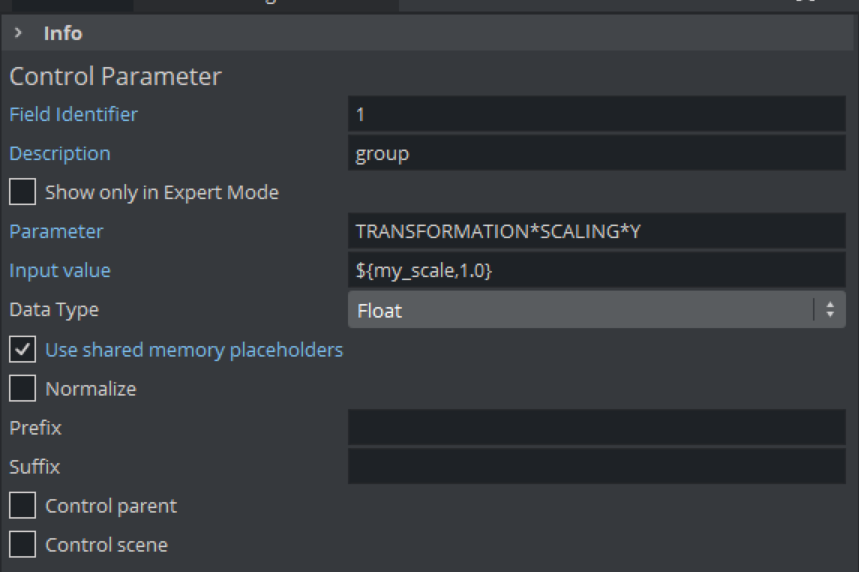
This applies a value to the Y scaling of the container with 1.0 as default value. By sending GLOBAL*MAP SET_DOUBLE_ELEMENT my_scale 2.0, the scaling changes to 2.0.
Information: Shared memory placeholders are available in Viz Plug-ins for Viz Engine 4.4.1 or later.
The following plug-ins support Shared Memory placeholders:
Control Image
Control PreProcessing TextureRenderer