
The Control Image plug-in creates an image control in the control clients.
Control Image must be placed on the container that holds the image/texture.
If an image/texture is invalid or Viz Engine for some reason cannot load it, then the current image/texture remains visible.
Note: This plug-in is located in: Plugins -> Container plug-ins -> Control
Control Image Properties
Expose Image Position: Allows the user to change the position of the image/texture.
Expose Image Scaling: Allows the user to change the scaling of the image/texture.
Set MaterialDefinition BaseColor: Sets the given image as BaseColor channel on a PBR or Phong Material.
Set MaterialDefinition Emissive: Sets the given image as Emissive channel on a PBR or Phong Material.
Deny Browsing Upwards- Restricts the user from browsing for images/textures in folders other than the selected folder and its sub-folders when enabled.
Expose as text: Works ONLY if the
Image Location Prefixis definedImage location Prefix: If the full path to a folder is entered, the image/texture location exposed to the control clients can be a simple string, instead of a full path. This is relevant if connected to a newsroom system. For example if a user wants edit a text and an image/texture on the same tab-field by just entering a text string. This is relevant if a user has a folder containing flag images/textures, and the control client receives “US” from the external system it loads the image/texture with the path: “image location prefix + US”, which then typically would be the “Stars and stripes” (flag of the U.S.A).
Input Value: Shows the current value for the plug-in. It is not necessary to set any value here. It is used for debugging purposes.
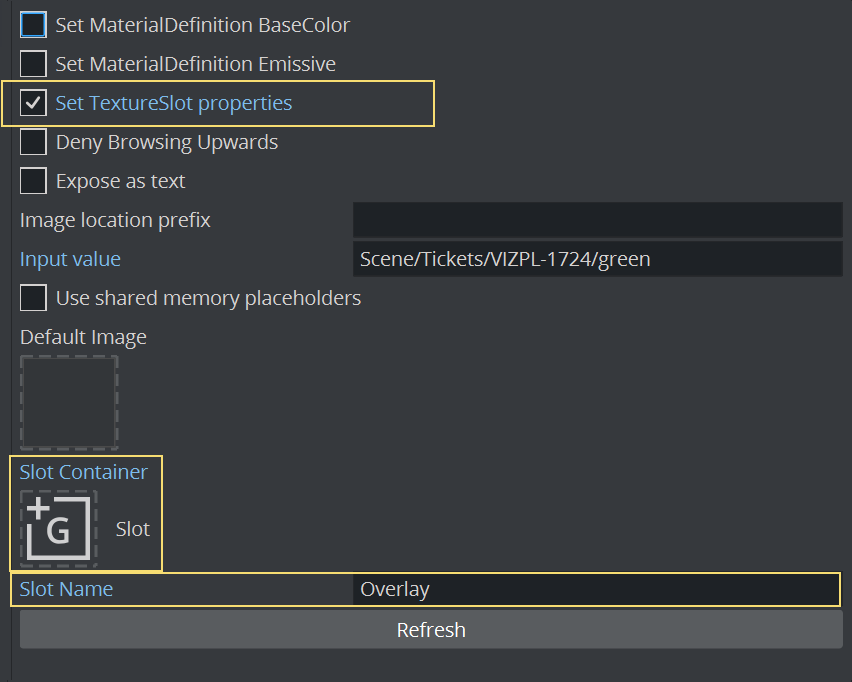
To Use with Texture Slot
Control Image can be used to set images onto Texture Slot for Viz Engine Renderer. Enable the Set TextureSlot properties and give a unique name inside Texture Slot (for example, Overlay). If Texture Slot is located anywhere else the local container, the container must be provided:
See Also