The Log panel provides messages and notifications from the Tracking Hub. The bottom line displays information about which Tracking Hub the Studio Manager is connected to. You can open and close the Log panel by clicking View Log in the Configuration Panel.
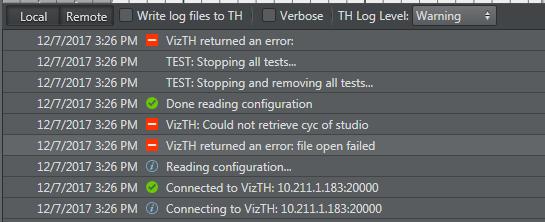
You can copy each entry in the Log Panel to the clipboard by right-clicking the entry and selecting Export message to clipboard. The information can be copied to the clipboard as plain text or as XML encoded text.
 Export Log to a file...: Exports the log file as XML or as plain text.
 Delete Log Entries: Clears all log messages from the window.
Write Log File on VizTH: Makes the Tracking Hub write a time-stamped log file for all tracking data received and sent to Viz Engine when selected. Additional timing information is logged as well. The log files are:
VizTH_rcv<n>.logVizTH_send<n>.logVizTH_timing<n>.log
They are located in
C:\ProgramData\vizrt\VizTH. When either the received or the sent log reaches 1 MB, all three files are closed and a new set is started with an incremented number. : Changes the view of the debug output between the Studio Manager or the connected Tracking Hub.
Verbose: Enables verbose logging when the check-box is selected.
TH Log level: Use the drop-down menu on the right side to select the log level:
Fatal: Displays only fatal errors (lowest log level).
Error: Displays Fatal and Error messages.
Warning: Displays Fatal, Error and Warning messages.
Information: Displays Fatal, Error, Warning and Information messages.
Debug: Displays Fatal, Error, Warning, Information and Debug messages.
Verbose: Displays all messages (highest log level).
The log level decides which messages Tracking Hub generates. Where those messages end up is configured separately, in
Trackinghub_log_config.json, and the two limits do not match:The console shows Information and above. With the delivered configuration, Debug and Verbose messages never appear in the console.
The log file records Debug and above, so Verbose messages are not written either.
To see Debug or Verbose output, lower the corresponding sink level in
Trackinghub_log_config.json. Tracking Hub prints a reminder in the console whenever a level below Information is selected.Messages are written by a rotating file sink, configured in
Trackinghub_log_config.jsonaslogs/th_<n>_default, with up to 1024 MB per file and up to 10 files.