A simple scene can be created to have the RectXYZ plug-in updated within a Viz Engine Scene.
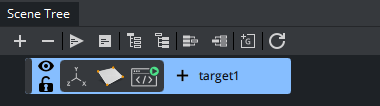
Create a container, add the RectXYZ and a script plug-ins. Copy the following script into the script editor and compile.
dim coordinates as Array[String]dim targets as Array[String]targets.Push("target1")targets.Push("target2")targets.Push("target3")targets.Push("target4")sub OnInitParameters() RegisterParameterString("prefix", "Prefix","", 50,255, "") RegisterParameterDropDown("my_target","Choose Target",1, targets, 100, 50) RegisterParameterBool("debug", "Print Changes" , false)end subsub OnParameterChanged(parameterName As String) Vizcommunication.Map.RegisterChangedCallback(GetParameterString("prefix") & targets[GetParameterInt("my_target")])end subsub OnSharedMemoryVariableChanged(map As SharedMemory, mapKey As String) if GetParameterBool("debug") then println 3, mapKey & " : " &map[mapKey] end if coordinates.clear() cStr(Vizcommunication.Map[mapKey]).Split(",", coordinates) this.Geometry.SetParameterDouble("top_right_x",cDbl(coordinates[0])) this.Geometry.SetParameterDouble("top_right_y",cDbl(coordinates[1])) this.Geometry.SetParameterDouble("top_right_z",cDbl(coordinates[2])) this.Geometry.SetParameterDouble("top_left_x",cDbl(coordinates[3])) this.Geometry.SetParameterDouble("top_left_y",cDbl(coordinates[4])) this.Geometry.SetParameterDouble("top_left_z",cDbl(coordinates[5])) this.Geometry.SetParameterDouble("bottom_left_x",cDbl(coordinates[6])) this.Geometry.SetParameterDouble("bottom_left_y",cDbl(coordinates[7])) this.Geometry.SetParameterDouble("bottom_left_z",cDbl(coordinates[8])) this.Geometry.SetParameterDouble("bottom_right_x",cDbl(coordinates[9])) this.Geometry.SetParameterDouble("bottom_right_y",cDbl(coordinates[10])) this.Geometry.SetParameterDouble("bottom_right_z",cDbl(coordinates[11]))end sub