The following systems are described:
Configuring Lighting Control
To configure lighting
Navigate to AV Automation > Devices > Properties > Light Control tab.
Check the Light Control checkbox to enable one of the devices.
MIDI Show Control
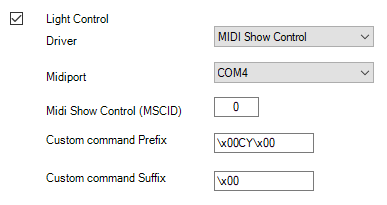
Midiport: System MIDI port to communicate with the light board.
Midi Show Control (MSCID): The MIDI Show Control ID used for communicating with the light board.
Default: 0.Custom command Prefix: The prefix test sent with the MIDI Show Control command. Characters can be escaped using the x00 where 00 is replaced by the numeric value of the character.
Default: \x00CY\x00.Custom command Suffix: The suffix sent with the MIDI Show Control command. Characters can be escaped using the x00, where 00 is replaced by the numeric value of the character.
Default: \x00.
OSC (Open Show Control)
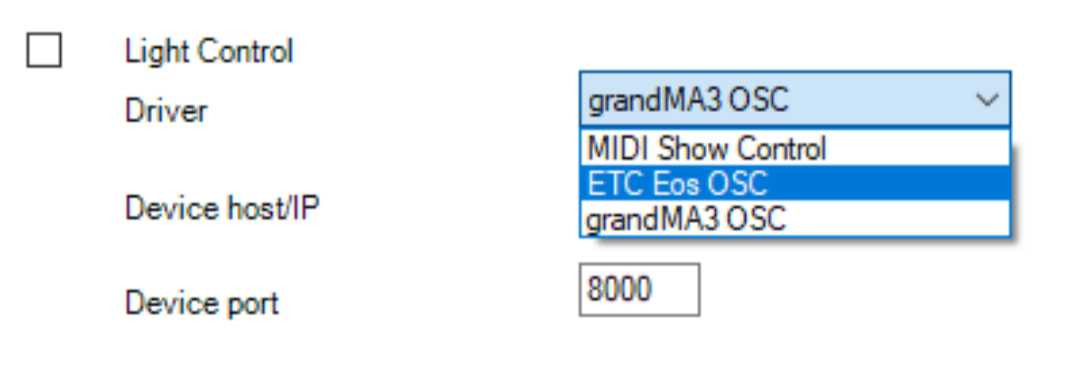
Driver: either grandMA3 or ETC EoS
Device host/IP: host name or IP address of the lighting console.
Device port: port number specified on the lighting console for receiving OSC messages.
Viz Mosart supports OSC 1.1 (SLIP) via TCP.
grandMA3
In a simple setup, one OSC In&Out configuration should be created on grandMA3 that enables receiving commands from Viz Mosart.
For redundant Mosart Server setups, it is possible to create two OSC In&Out configurations on the device, matching IP addresses to main and backup.
Viz Mosart’s grandMA3 driver is implemented against the console’s software version 2.3.
ETC Eos family
Enable OSC connection on the device under System/Show Control.
Viz Mosart’s ETC driver is implemented against the console’s software version 3.3.