The NDI protocol is built in natively into Viz Engine. It can be used in combination with a Matrox topology board or in pure Software I/O mode. Other video boards are not supported.
NDI Input
To receive NDI streams, set the type of a Live input channel to NDI and select an NDI source. This is done Configuration > Video Input: Live Input. The NDI source can also be changed with the NDI control plug-in. The NDI stream can be used as a regular live input.
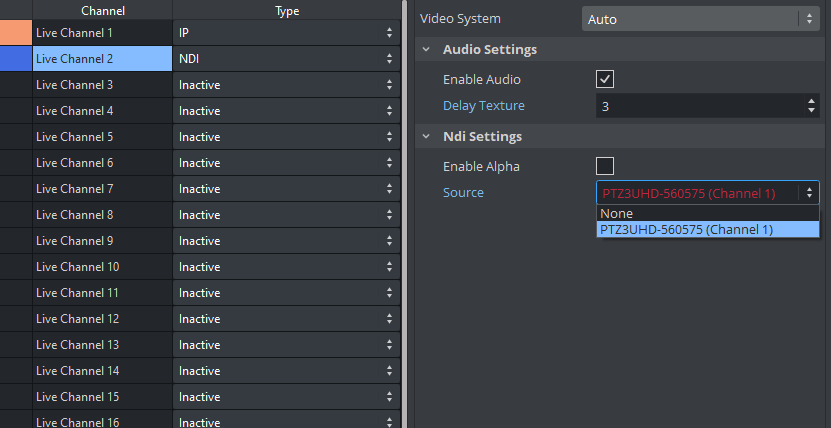
If at least one NDI input is configured during startup, Viz Engine scans the network for NDI senders. All discovered sources are shown in the drop down menu.
Note: If a source can not be discovered, install the NDI tools and manually add the source by using the NDI Access Manager.
The configured input video system is only used as the initial value. At runtime, Viz Engine dynamically adapts to changes in the resolution and frame rate of the NDI input stream.
NDI senders are generally not synced and run at slightly different frequencies. To compensate for these differences, Viz Engine skips or repeats NDI input frames as necessary to make playback as smooth as possible.
Note: The maximum number of inputs is limited by the network capabilities and the resolution. Usually two 1080p inputs on a dedicated network are realistic.
If the alpha channel of the NDI input signal needs to be considered, Enable Alpha needs to be turned on.
Input Drop Detection
To prevent the engines console to be flooded with messages about dropping frames if the incoming signals is unstable or does not match the output framerate, you can enable the drop detection in config file or with a command.
ndi_input_drop_detection = 1/0 in section VIDEO en/disables the detection and protects console flooding. Alternatively you can send CONFIGURATION*VIDEO*NDI_INPUT_DROP_DETECTION SET <value>
NDI Output
The Viz Engine output registers itself as NDI stream if a valid license is available and configured and the output is enabled in the Viz Configuration File. The name of the NDI sender is VizEngine-N, where N is the instance number.
Information: To use NDI output in combination with Matrox boards, it has to be explicitly enabled by setting NdiOut1.Enable = 1 in section CHANNELS_CONFIG in your Viz Configuration File. In Software I/O Mode NDI (see below) this the NDI output is enabled by default and can be disabled by setting NdiOut1.Enable = 0.
By default the NDI output of Viz Engine is a fill and key signal. To send fill only, set "NdiOut1.ContainsAlpha = 0" in the configuration file.
In Software I/O mode, the NDI output can also be sent as compressed NDI HX (H.264) to save network bandwidth. See NDI HX Output.
NDI in Software I/O Only Mode
To configure Viz Engine using NDI without any video board:
Uncheck User Defined in Check Video Card.
Set the Software I/O Mode to NDI.
Live inputs can then be mapped to NDI sources in Configuration > Video Input: Live Input.

SDK Versions
The following table lists the SDK version Viz Engine is built with:
Viz Engine | NDI SDK |
|---|---|
5.6 | 6.3.2 |
5.5 | 6.2.1 |
5.4.1 | 6.2.1 |
5.4.0 | 6.2.0 |
5.3 | 6.0.1 |
5.2 | 5.6 |
5.1 | 5.5.3 |
5.0 | 5.5.1 |
4.3, 4.4 | 4.6 |
4.1, 4.2 | 4.1 |
4.0 | 3.8 |
3.14.3-3.14.5 | 4.1 |
3.14.1, 3.14.2 | 3.8 |
NDI HX Output
Starting with Viz Engine 5.6, the NDI program output can be sent as NDI HX: an H.264-compressed NDI stream encoded on the NVIDIA GPU (NVENC), instead of the standard full-bandwidth NDI stream (SpeedHQ). NDI HX needs a fraction of the network bandwidth, at the cost of some picture quality and latency. The NDI source keeps its name (VizEngine-N), so receivers do not need to be reconfigured.
When to Use NDI HX
NDI HX is the better choice when network bandwidth matters more than the last bit of picture quality:
Remote and distributed production: sending graphics over WAN, VPN or Internet links (for example through NDI Bridge), or over Wi-Fi.
Cloud-hosted engines: where outgoing network bandwidth is limited or billed by volume.
Many streams on one network: several engines feeding a vision mixer, or one engine watched by many receivers (multiviewers, producer or confidence monitoring) on a 1 GbE network.
NDI HX-aware tools: software mixers, recorders and streaming encoders that take H.264 NDI sources.
Less CPU compression load: the video compression runs on the GPU's dedicated video encoder instead of the CPU.
Keep the standard NDI output when you need the highest picture quality or critical keying (H.264 4:2:0 compression softens fine text, thin lines and key edges), the lowest latency, interlaced output, HDR, more than 8 bits, or fill and key in UHD.
Standard NDI and NDI HX Compared
Standard NDI (default) | NDI HX | |
|---|---|---|
Video codec | SpeedHQ (intra-frame) | H.264 High profile, 8-bit 4:2:0, BT.709, constant bit rate |
Bandwidth at 1080p50 | more than 100 Mbps | about 14 Mbps by default (configurable), plus a preview stream of about 5 Mbps |
Compression runs on | CPU | NVIDIA GPU (NVENC) |
Formats | Progressive and interlaced, 8 and 16 bit, SDR and HLG | Progressive, 8-bit, SDR only |
Fill and key | Yes | Up to 2048 lines (for example 1080p); UHD is sent fill only |
Latency | Lowest | One frame more on the sender, plus decoding on the receiver |
Audio | PCM | PCM (unchanged) |
To Enable NDI HX
Configure Viz Engine for Software I/O mode NDI.
In section CHANNELS_CONFIG of the Viz Configuration File, set:
NdiOut1.HxEnable =1NdiOut1.HxTargetBitRateInBitsPerSec =0Restart Viz Engine.
Check the console for a line like:
NDI HX output enabled: 'VizEngine-1' 1920x1080 @ 50/1 H.264 (NVENC), 14200000 bps.While the engine is on air, the Video Encode graph of the GPU in Windows Task Manager shows activity.
Setting | Default | Description |
|---|---|---|
|
|
|
|
| Target bit rate of the main stream in bits per second, for example |
Note: These settings are available in the configuration file only, and changes need a restart. NdiOut1.ContainsAlpha works as for standard NDI. The codec, keyframe interval and preview stream are fixed.
What Viz Engine Sends
Main stream: full output resolution and frame rate, constant bit rate, with a keyframe about every second. A receiver that connects mid-stream gets a keyframe immediately.
Preview stream: 640 pixels wide (640x360 for 16:9) at the same frame rate, about 5 Mbps at 50 fps. Receivers in preview or low-bandwidth mode (multiviewers, Studio Monitor in low-bandwidth mode) use it. It is not sent when the output is 640 pixels wide or less.
Alpha: with
NdiOut1.ContainsAlpha = 1(the default), fill and key are sent as one H.264 stream with alpha. Alpha doubles the encoded picture height, and the H.264 encoder is limited to 4096 lines. So alpha is available up to 2048 lines; UHD outputs are sent fill only, with a warning in the console.Audio, Viz Trio and TriCaster integration work as with standard NDI.
Performance
Encoding adds work on the GPU and the CPU for every frame. On a Lenovo P620 with an NVIDIA RTX A4000, the maximum render rate at 1080p50 went from about 600 fps (standard NDI) to about 300 fps (NDI HX), and was about 160 fps at UHD50. Both are well above real time, but test heavy scenes with HX enabled.
Automatic Fallback and Limitations
If NDI HX cannot be used, Viz Engine sends standard NDI on the same source and writes a warning to the console. In these messages, "raw video path" means standard NDI.
Situation | Result | Console message |
|---|---|---|
Interlaced format (including PAL/NTSC) or 16-bit output | Standard NDI |
|
HDR (HLG) output | Standard NDI |
|
Odd width or height | Standard NDI |
|
No NVIDIA driver or NVENC, session limit reached, or resolution beyond the encoder's limits | Standard NDI |
|
Fill and key above 2048 lines (UHD) | NDI HX, fill only |
|
Preview stream cannot be created | NDI HX, main stream only |
|
Encoder error while on air (for example a driver reset) | The frame is dropped and the encoder restarts, up to 3 times in a row. After that, the output switches to standard NDI on the same source without a restart. |
|
Further limitations:
NDI HX applies only to the NDI program output in Software I/O mode (
NdiOut1). NDI output together with a Matrox board, NDI Output from GFX Channel, and additional (parallel or Media Asset) NDI outputs always use standard NDI.H.264 only: no HEVC, no 10-bit, no HDR.