This section has information on the following topics:
The decision about which hardware to use when setting up a video wall depends a great deal on how the video wall can be used. In the most basic sense, any multi-display setup can be used. However, when in need of a an increased number of displays, clip playback capabilities, live streams, or complex graphics, the demands on the hardware increases significantly. A video board is required for clip playback and input capabilities.
Utilizing the NVIDIA Quadro P6000 graphics cards and the Matrox X.mio3 video board, Viz Engine support video wall configurations with up to 16k by 16k output resolution, and up to eight SDI inputs. Depending on the selected configuration, Viz Engine currently supports the following inputs and outputs for video walls:
Four to eight SDI inputs, with resolutions ranging from SD to UHD, with a maximum of eight 1080i or one UHD concurrent input. (X.mio3).
Up to six UHD inputs on X.mio5 SDI (and Gen-4 PCI).
Four to 16 DisplayPort or DVI outputs, with up to UHD resolution per output.
Note: More GPUs require more bandwidth and therefore decrease the performance. Therefore, it is strongly recommended to use only one physical GPU and split the outputs (4*5K on P6000) with additional hardware like a Datapath Device.
Minimum Hardware Configuration for Video Walls
HP Z8-series Desktop Workstation
NVIDIA RTX A6000 graphics card or RTX 5000 Ada
Matrox X.mio5 video board or Matrox DSX LE5 video board
NVIDIA RTX Pro Sync synchronization card
Recommended Configuration for Video Walls
HP Z8 Fury Desktop Workstation
NVIDIA RTX Pro 5000 Blackwell or 6000 Max-Q Blackwell graphics card
Matrox X.mio5 video board or Matrox DSX LE5 video board
NVIDIA RTX Pro Sync synchronization card
Note: Videowall configurations require a DVI Max Resolution license.
UHD Configuration with X.mio5 Boards
With the high bandwidth required to transform UHD surfaces to the GPU, any system that requires more than three UHD surfaces (no matter if live or clip) needs to be a Gen-4 PCI equipped system (like a Lenovo P620, HP G5 or G6i and a Gen-4 GPU, or like an A5000 or A6000). This guarantees playback of eight UHD surfaces (live or clips).
IP-based Video Walls
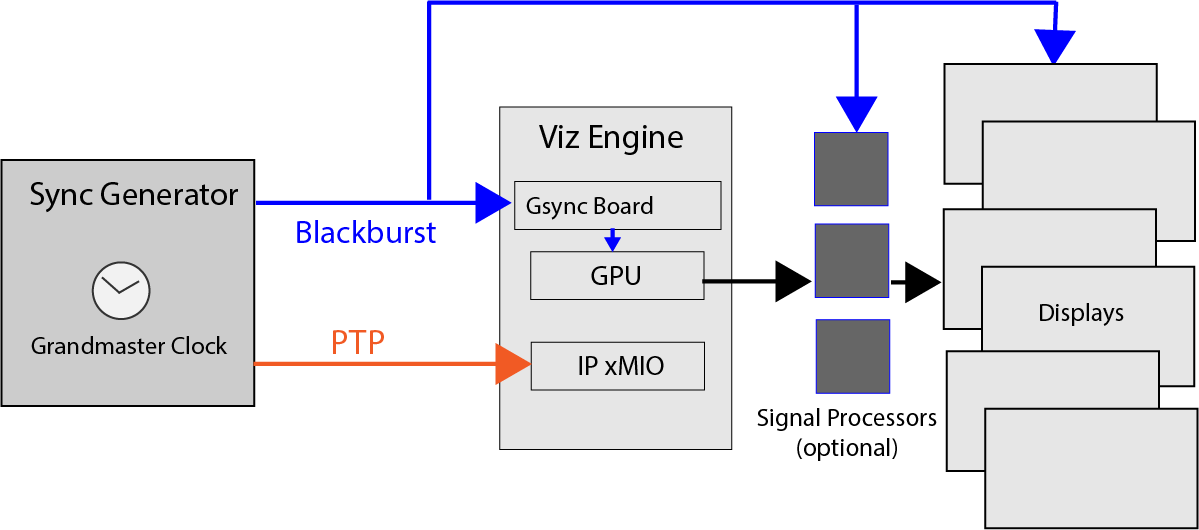
X.mio5 based topology boards do not have a genlock connector anymore, they only synced using PTP (older X.mio3 IP boards still have a Genlock connector). To correctly synchronize a videowall using X.mio5 boards, you need:
A valid PTP signal.
A blackburst signal to synchronize the NVIDIA gSync board.
A blackburst signal for any additional device (for example, Signal processors or the displays).
All of these signals need to be driven from the same source. Therefore, it is highly recommended to use a system generating PTP and Genlock sources from the same clock.
The following diagram illustrates a basic synchronization flow: