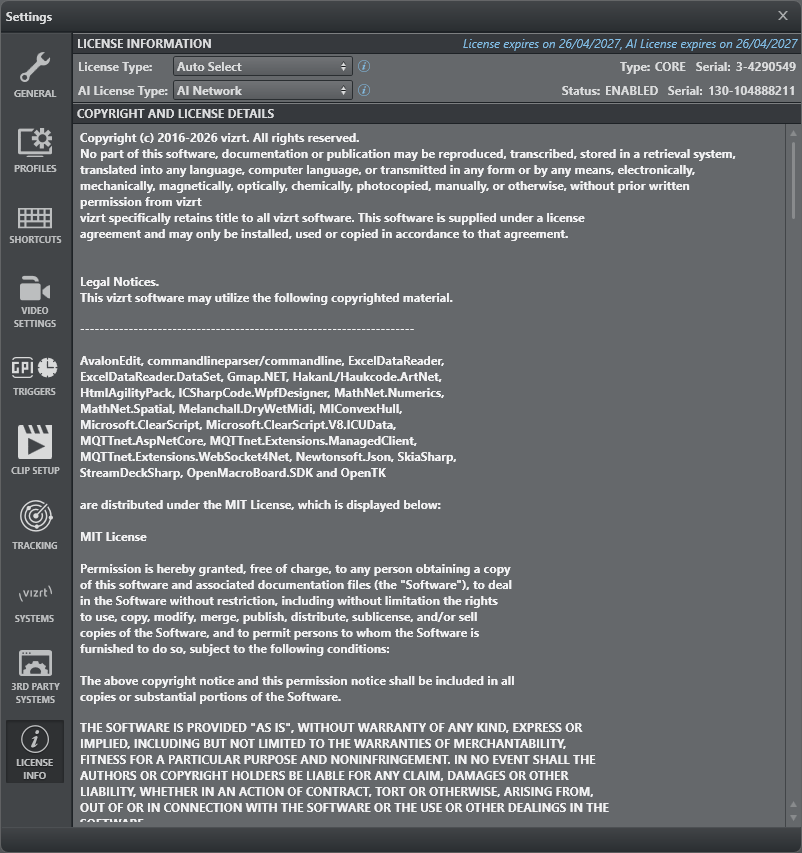
The Info window contains general software information:
Viz Arc license details.
General Software Copyright and licensing.
Info: Contact your local Vizrt Support Representative or send an email to [email protected] to obtain a license.
License Information
The LICENSE INFORMATION section shows which license is currently in use and lets you choose which license Viz Arc acquires:
License Type: Selects the type and location of the main license — Auto Select picks the most powerful license available, or force a CORE or FREEMIUM license from the network or a local container, optionally as a V3 variant.
Type: The license currently acquired (CORE or FREEMIUM).
Serial: The serial number of the license container in use.
AI License Type: Selects where the AI license is acquired from — the AI license can be sourced from a different location than the main license — or disables the AI features altogether.
Status: Shows whether a valid AI license is in use (ENABLED, DISABLED or NOT AVAILABLE).
See License for a detailed description of the available license types, license locations and all configuration options.
Copyright and License Details
The COPYRIGHT AND LICENSE DETAILS section shows the software copyright notice and the license details of the third-party components used by Viz Arc.