A style sets the look of template forms in Pilot Edge and Template Builder: colors, fonts, font size, corner radius and grid size. Styles are created in the Style Editor in Template Builder and stored in Pilot Data Server. A style can be applied to all forms as the default style, or to a single template from its script.
Styling requires Pilot Data Server 9.8 or Pilot Core Service 1.1 or later. With an earlier version, the Style Editor is not available and forms use the built-in style.
Create a style
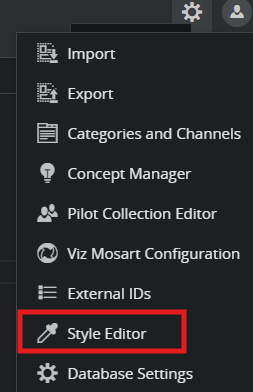
Click the Tools button on the toolbar and select Style Editor.
Click Add Style and enter a name. Names must be unique (not case-sensitive).
Set the properties described below. The Preview shows a sample form with the current values; Show validation errors adds error states to it.
Click Save. Reset reverts to the last saved values.
The context menu of a style in the list has Rename Style, Duplicate Style and Delete Style. Forms that use a deleted style fall back to the default style.
Colors
A style has two color palettes, Dark and Light. Forms use the palette that matches the application's theme. Select the palette to edit with Color palette; each palette has its own colors, including the text color. Fonts and layout apply to both palettes.
Color | Used for |
|---|---|
Canvas | The form background. Borders, and text unless set, adapt to light or dark canvases. |
Primary | Primary buttons, the focused field outline and active controls. |
Selected | The background of selected items in lists. |
Danger | Validation errors and destructive actions. |
Text | Labels and input text. Optional: when empty, black or white is chosen to contrast with the canvas. A warning shows when the contrast is low. |
A style with an invalid color cannot be saved. The editor indicates when the other palette has an invalid color.
Typography
Font family: a list of fonts, tried from top to bottom; the first available font is used. With no fonts, the default font is used. Fonts are selected from the font library. Add New Font adds a font to the library from Google Fonts, a local font, or a font file URL. A font that is not in the library is used only when it is installed on the client machine.
Font size (8–16 px): the size of input text. Labels scale with it.
Layout
Corner radius (0–16 px): the rounding of fields and buttons.
Grid size (6–16 px): the row height and the spacing around and between fields. Field heights scale with it; the font size does not.
Apply a style
A form uses the first of these that refers to an existing style:
Template style: the style set by the template script.
URL parameter: the
$styleparameter in the Pilot Edge or Template Builder URL.Default style: the style set as default for the system.
Built-in style.
Default style
The default style applies to all forms in Pilot Edge and Template Builder that do not set a style of their own. Set it in one of these places:
In the Style Editor, select the style and click Set as Default. The default style is marked in the list. Remove as Default reverts to the built-in style.
In DataServerConfig, in the Pilot Edge settings, select Default style.
Both store the style in the env-style database parameter. Deleting the default style reverts to the built-in style.
URL parameter
As env-style is an environment variable, the $style URL parameter overrides the default style for one client:
http://pds-host:8177/app/pilotedge/pilotedge.html?$style=Studio%20DarkTemplate style
A template can set its own style in the template script, by the style's name:
vizrt.$pilot.styleEditor.templateStyle = "Studio Dark"An empty string uses the default style. If the style is renamed or deleted, the template falls back to the default style until the script is updated.