In the case of a backup operation, both Tracking Hubs send tracking data to the Viz Engine(s). To prevent the continuity warning message appearing repeatedly on the Viz Engine console, set the following configuration flag in the Viz Engine configuration file:
trackinghub_warning_level = 1You must configure the Network settings on both Tracking Hubs (see Start Viz Virtual Studio). Go to Tools > Settings to set up a backup Tracking Hub.
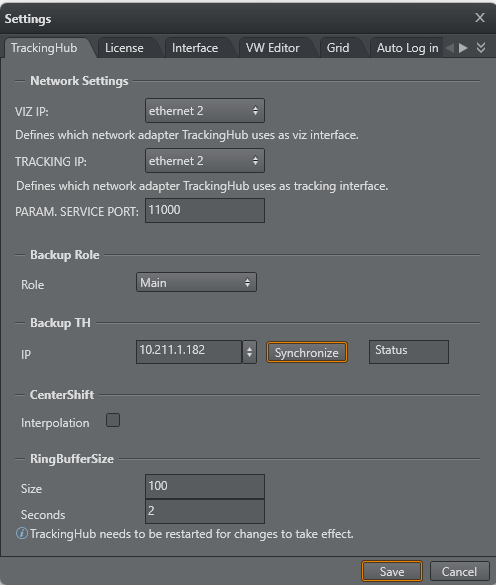
Click the drop down menu to open a selection of available Tracking Hubs. You must select the respective other for both Tracking Hubs. For example:
TH1 has IP: 10.211.1.153 | TH2 has IP: 10.211.1.183 |
Backup TH: 10.211.1.183 | Backup TH: 10.211.1.153 |
Click Synchronize to synchronize the configuration from one Tracking Hub to another.
Master and Slave
A backup pair is not symmetric. Each Tracking Hub carries a backup rule of its own, which is either Master or Slave, and the two must be set accordingly:
Master: holds the configuration that is distributed. Synchronize is started here.
Slave: receives the configuration, receives the Master’s lifesign, and monitors it.
The Slave watches the Master’s lifesign continuously:
Missing for more than one day: the Slave sends a notification, repeated once an hour.
Missing for more than two days: the Slave reconfigures itself as a standalone Tracking Hub. Its backup rule is set to none, the backup address is cleared, the change is written to
BaseConfig.xml, and the license is released and requested again for standalone operation.
The standalone switch is permanent. When the Master comes back, the pair has to be configured again on both machines.
What Synchronize transfers
Synchronize is started on the Master and sends the following to the Slave, in this order:
The Cyc file
The lens files
The XML tracking description, if one is configured
The LUT files, if any are in use
The video wall file
The router configuration, if one is configured
The current state
The studio configuration file
Close the Lens File Editor before synchronizing. While it is open, the command is refused with a message.
Sending to Viz Engine while a backup is configured
Without a backup partner, Tracking Hub sends the data of every rig. As soon as a backup partner is configured, both hubs restrict their output: a rig is sent only while its tracking is good. The hub that currently holds valid data therefore supplies the Engine.
Both hubs still address the same Engines, which is why the continuity warning has to be suppressed with trackinghub_warning_level = 1.
Important: When using serial interfaces, the COM ports might be different on these PCs. Always inspect the selected COM ports after synchronization, and if necessary, modify them.