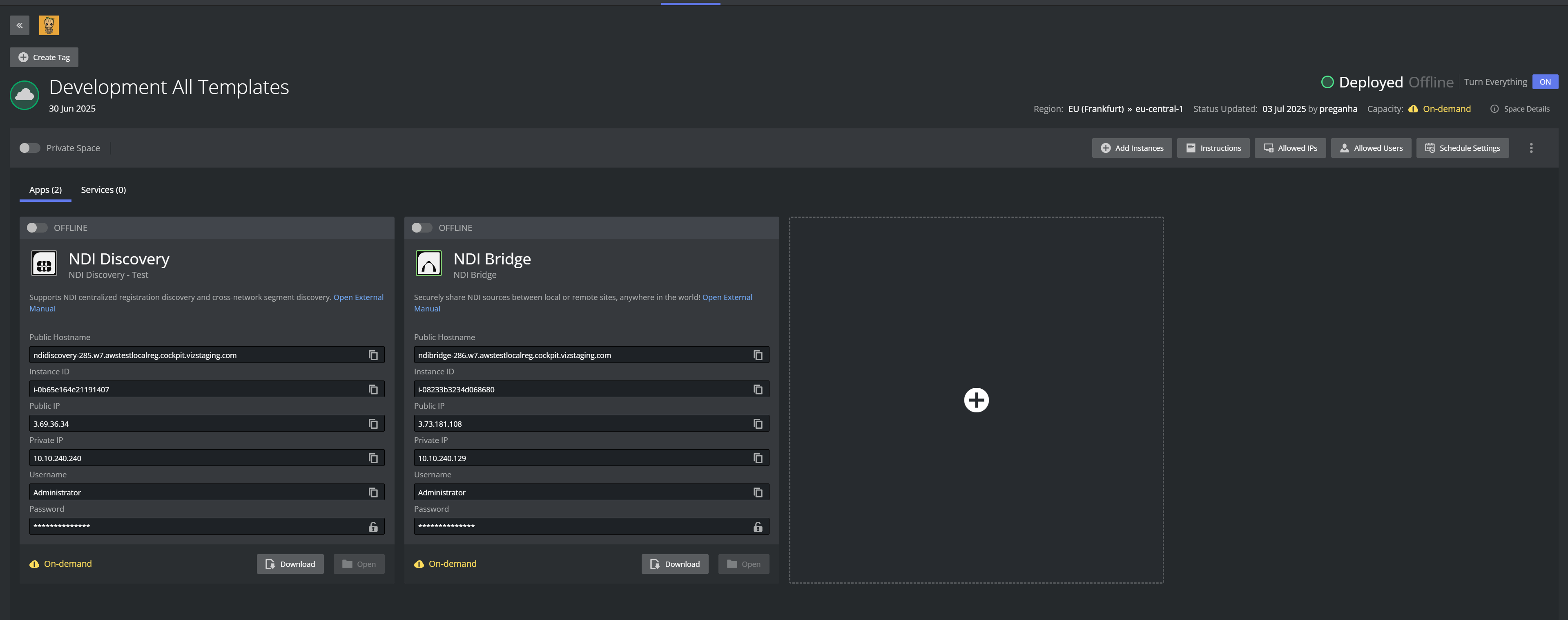
To improve transparency and operational awareness, Viz Now uses visual indicators at both App and Space levels, that reflect the capacity status of your deployment.
These indicators help you quickly understand whether apps are backed by reserved capacity or are relying on standard On-Demand EC2 behavior.
App-Level Indicators
Each deployed app displays:
✅ Reserved: Indicates the instance is covered by an active targeted capacity reservation
⚠️ On-Demand: Indicates the instance is running without a reservation (higher risk of AWS capacity failure)
⏱️ Time Remaining: If reserved, the UI shows how long the reservation remains valid.
This provides users with precise insight into which components of their workflow are most secure from capacity interruptions.
Space-Level Summary Indicator
At the top-right of the Space, a unified status label summarizes overall capacity:
On-Demand: All apps in the space are running without capacity reservations
Partially Reserved: Some apps are running with active reservations, others are not
Fully Reserved: All apps are backed by active reservations.
This top-level overview allows users to:
Assess deployment risk at a glance
Know when action might be needed (for example, re-reserve capacity, relaunch with fallback)
Track improvements from retry logic or new reservation attempts.