Capacity Check & Reservation Feedback
In Viz Now, the deployment process includes a smarter pre-launch validation step that checks whether Targeted Capacity Reservations (CRs) were successfully allocated for all required EC2 instances.
Rather than proceeding blindly and encountering AWS errors midway through deployment, Viz Now now enters a deploy-pending state whenever CR issues are detected before EC2 launch.
This proactive step improves transparency and control.
What the User Sees
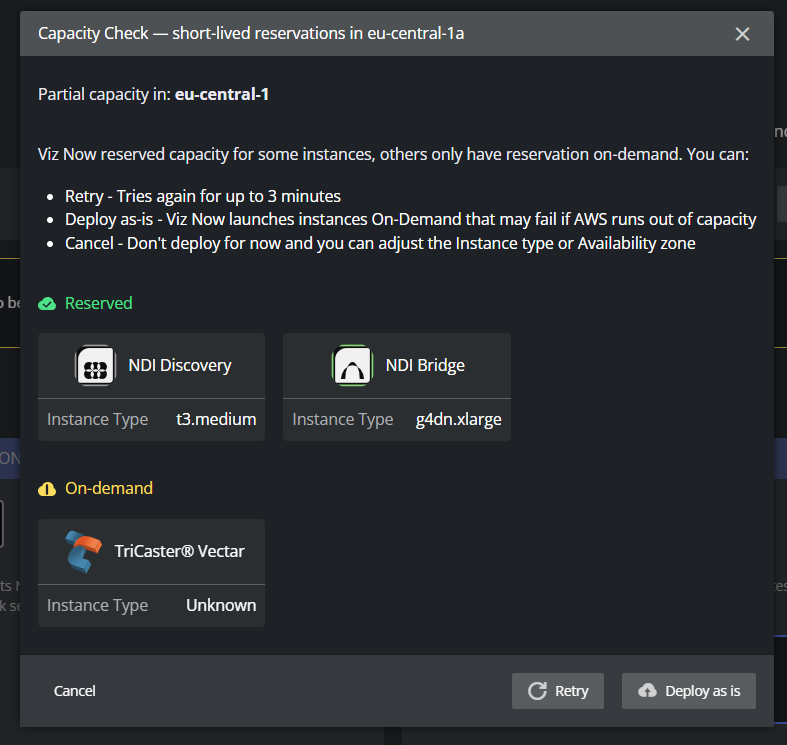
When capacity reservation issues are detected, Viz Now displays a Capacity Check dialog that includes:
✅ A list of instances successfully matched to short-lived reservations
⚠️ A list of instances that could not secure a reservation (e.g., due to regional capacity constraints)
Each instance is clearly marked with its reservation status (Reserved / On-Demand fallback), along with the instance type and function.
Your Options: Guided Response
Users can choose how to proceed based on current availability:
🔁 Retry: Viz Now will attempt to reserve capacity again for up to 3 minutes
❌ Cancel: Stop the deployment and return to the Configuration phase
⚠️ Deploy as-is: Proceed using On-Demand EC2 instances for any unmatched components
(Note: This increases the risk of AWS capacity errors during launch).
Why It Matters
This approach removes guesswork and avoids silent deployment failures by:
Making the reservation status visible before launch
Providing users with informed control over how to handle shortages
Supporting fast troubleshooting without manual digging through AWS logs or support tickets.