This section describes how to manually synchronize pages to specific destinations.
While automatic synchronization handles routine data transfers between channels, there are times when it is need to immediately push specific pages to one or more destinations. Using the manual synchronization feature gives direct control over when and where pages are synchronized.
Info: Manual synchronization bypasses approval status and allows syncing to any destination, including those disabled for automatic synchronization.
Synchronizing Pages Manually
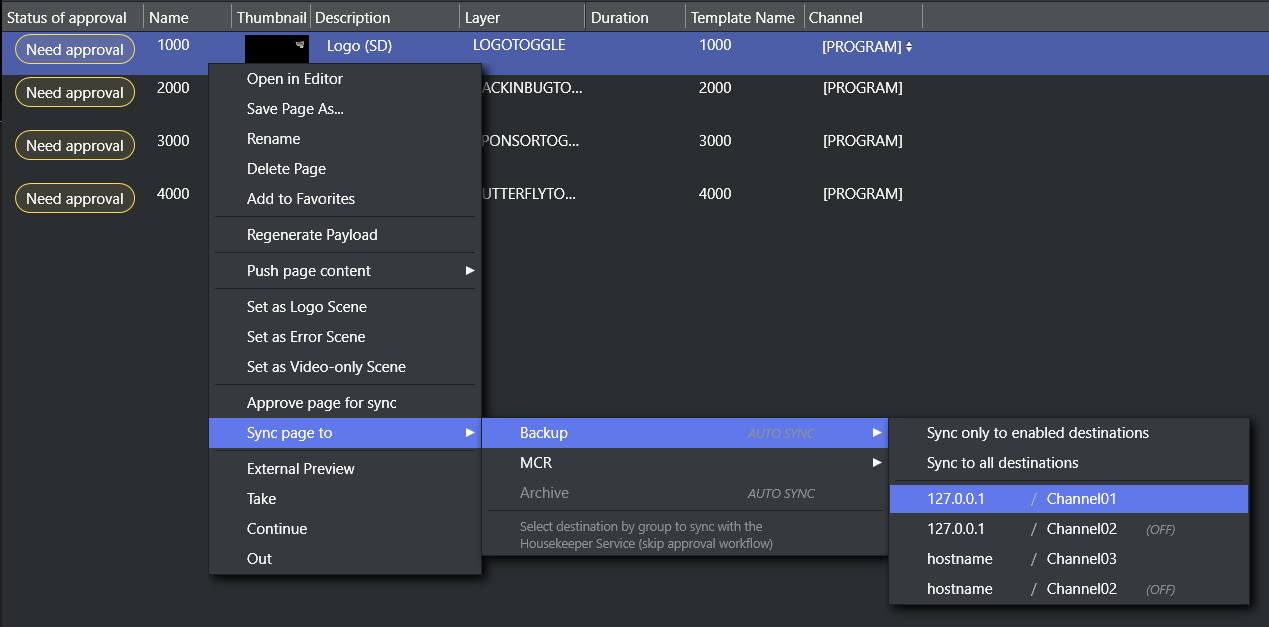
Select pages
Navigate to the Page Pool.
Select one or more pages you want to synchronize.
Hold Ctrl and click to select multiple individual pages.
Hold Shift and click to select a range of pages.
Access the sync menu
Right-click on your selection to open the context menu.
Click Sync page to to view all available synchronization groups.
Select a group
Hover or click on a synchronization group to expand its submenu.
Choose your destination
From the group's submenu, select one of the following options:
Sync only to enabled destinations: Syncs to destinations with auto-sync on.
Sync to all destinations: Syncs to all destinations in the group, including disabled ones.
A specific hostname / channel: Syncs to this single destination only.
Confirm and review result
After selecting a sync target, a confirmation dialog asks if you want to proceed with syncing the selected pages. Once confirmed:
Success: A notification confirms all the selected pages were synced successfully.
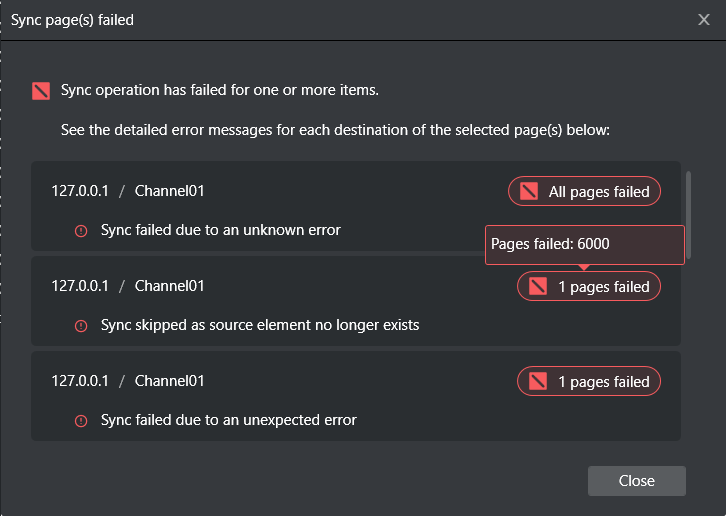
Partial or full failure: A dialog appears with detailed error information:
Each failed destination is listed with its hostname / channel (127.0.0.1 / Channel01 in example below)
A destination-specific error message explaining the failure
Failed page(s) counter (All, 1, 1 page failure in example below)
Hovering-over displays the name(s) of failed pages (1 page failure, with name 6000 in example below).
Info: If additional detail is needed, consult the Housekeeper Service logs.
Sync Status Indicators
Synchronization Groups
The groups in the "Sync page to" menu display different indicators based on their configuration:
Indicator | Meaning |
|---|---|
AUTO SYNC | Automatic synchronization is enabled for pages and destinations are configured |
no indicator | Automatic synchronization is disabled for pages and destinations are configured |
Grayed out | No destinations are configured for this group |
Destinations
Individual destinations within a group also display status:
Indicator | Meaning |
|---|---|
(OFF) | Automatic synchronization is disabled for this destination |
No indicator | Automatic synchronization is enabled for this destination |