How you debug a Viz Arc script depends on the script Engine it uses. The default and recommended engines (JavaScript ES6 and JavaScript) are based on Google's V8 engine and come with built-in remote debugging. You can attach any Chrome-based browser (via chrome://inspect) or Visual Studio Code to a running script and step through your code with breakpoints. See Debugging Scripts for a step-by-step guide.
Info: The V8-based engines require no additional installation for debugging. The global script listens on debug port 9222 and the template designer script on port 9223 by default. Both ports can be changed in the Scripting section of the general settings.
Note: The remainder of this page applies only to scripts using the legacy VB Script or JavaScript (Windows) engine types.
Enabling the Script Debugger for Legacy Windows Script Engines
Issue Details
I would like to debug my script (main or template script) using the legacy VB Script or JavaScript (Windows) engine, but I don’t get the line of the occurrence on the console output when the script runs into errors. What can I do?
Solution
The legacy Windows script engines rely on the Microsoft Process Debug Manager (pdm.dll) to provide detailed error information (such as the line number of an error) on the Viz Arc scripting console. The registration process of the pdm.dll differs depending on the version of the OS. To register the .dll, run cmd in admin (elevated) mode and type the command below that corresponds to your software configuration:
Windows 7/8/8.1:
Regsvr32.exe "C:\Program Files\Internet Explorer\pdm.dll"Windows 10 (up to version 1511):
Regsvr32.exe "C:\Windows\System32\F12\pdm.dll"
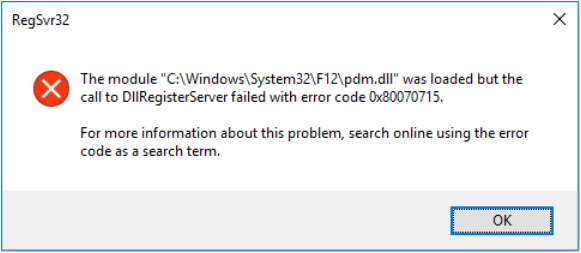
With Windows 10 version 1607 and above, pdm.dll can no longer be registered manually, but must be automatically registered by a Microsoft product. If attempting to register manually, RegSvr32.exe throws error 0x80070715.
One way to automatically register the .dll is to install Microsoft's Remote Tools for Visual Studio. Download the x64 version. This free tool will install and register the PDM. After installation, Viz Arc will automatically recognize the registered .dll.
Additional Information
The legacy Windows script engines are based on ClearScript which relies on the Microsoft Script Debugger that was released in 1997. This tool could be used to debug Visual Basic scripts (VBScript) or Java scripts (JScript) and was a complement to products such as Internet Explorer 4.0 and Internet Information Server 4.0. Until recently, it was a tool that Microsoft provided as a separate download on their homepage. It installed a shared library called the Process Debug Manager (PDM), which Viz Arc/ClearScript uses to debug its own VBScripts/JavaScript.
With Windows 7/8/8.1/10, users do not need to install this file separately, provided they have either MS Office or Visual Studio installed. It also installs with Internet Explorer 8 and above but is not registered (see the steps for registering the pdm.dll above). As the PDM library is already available on these systems, you only need to make sure the active .dll is registered in order for Viz Arc to recognize it.
See Also
Debugging Scripts