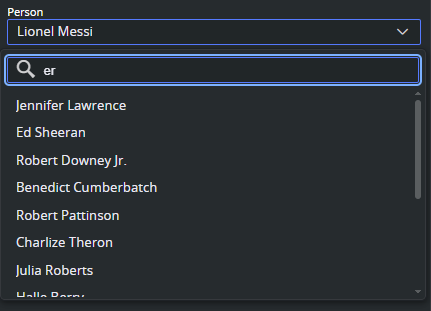
The JSON-backed drop-down is a Data Entry option that populates a field's drop-down from a remote REST endpoint returning JSON. Unlike the dynamic drop-down (which reads options from another field's value), this option fetches structured option data from a URL at runtime. This results in a searchable drop-down automatically filled with data.
How It Works
When a field is configured with a JSON-backed drop-down, Viz Pilot Edge makes a GET request to the configured URL when the template is opened. The response must be a JSON array of objects, each containing a label and value property. These become the selectable options in the drop-down.
The URL supports environment variable substitution using the {$VAR_NAME} placeholder syntax, allowing the endpoint to be configured per deployment without changing the template.
Expected JSON Format
The REST endpoint must return a JSON array where each element has at least a label and value:
[ { "label": "Option A", "value": "a" }, { "label": "Option B", "value": "b" }, { "label": "Option C", "value": "c" }]Configuring in Template Builder
Select the field.
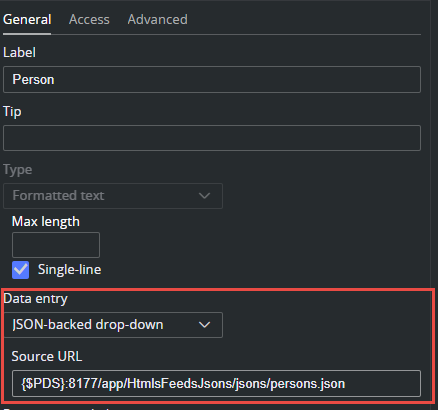
In the General panel, locate the Data Entry drop-down.
Select JSON-backed drop-down from the list.
A Source URL text field appears, enter the URL to your REST endpoint.
The URL field supports environment variable placeholders. For example: {$PDS}/app/HtmlsFeedsJsons/jsons/persons.json resolves tohttp://pds-host:8177/app/HtmlsFeedsJsons/jsons/persons.json.
This resolves at runtime using the environment variables defined for the template, so the same template can point to different servers in different environments.
It is also possible to define custom environment variables through the optional settings (prefixed with env- in DataServerConfig settings) or via URL parameters (for example, ?$APP_SERVER=value).
See also: