The Graphic Hub REST API documentation provides a programmer with the necessary information to use the Graphic Hub REST API. The API documentation can be accessed by selecting the GH REST API from the Help menu, or entering http://127.0.0.1:19398/doc/documentation.html in the web browser address bar.
GH REST Configuration Settings
To make changes to the default REST configuration settings, select GH REST from the Configuration menu. Any changes made are highlighted by the parameter name changing color. Click Apply to apply any changes, or Back to go back to the main configuration page.
Note: Any changes to the GH REST configuration do not take effect until the Graphic Hub REST service has been restarted.
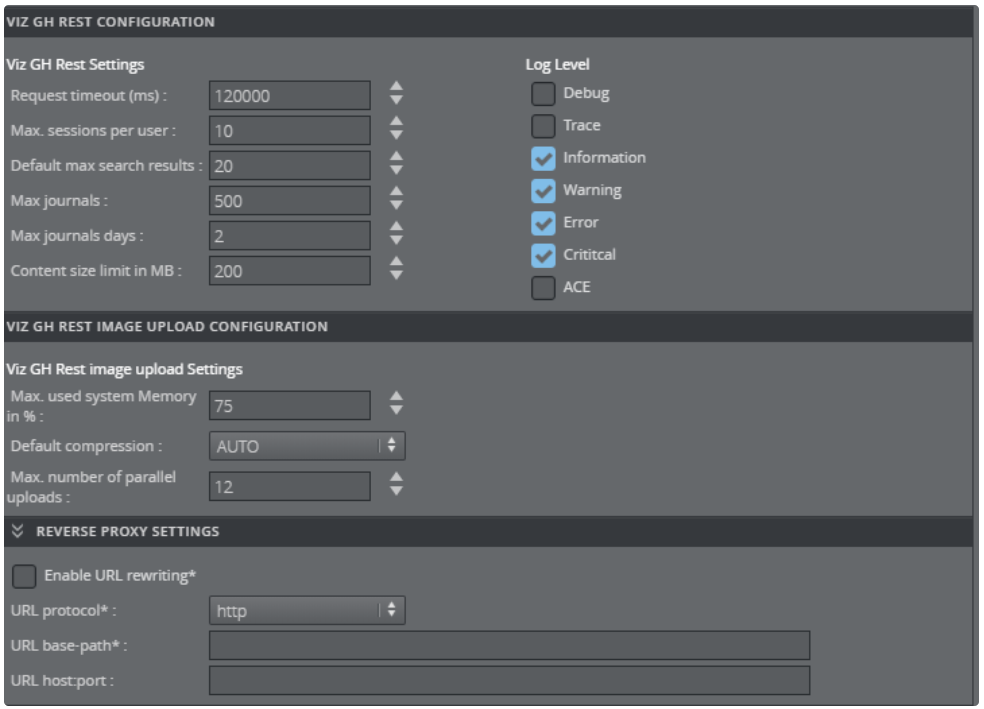
VIZ GH REST CONFIGURATION
Request timeout (ms): If the defined timeout is exceeded, the HTTP daemon disconnects the request. The default value is
120000.Max. sessions per user: Sets the maximum number of sessions per user connecting to the Graphic Hub. The default value is
10.Default max search results: Sets the default number of maximum search results. The default value is
20.Max journals: Sets the maximum number of buffered journals. By setting the value to
0, buffered journals are disabled. The default value is500.Max journals days: Defines the maximum days to retrieve journals, subtracted from the current date. The minimum value is
1. The default value is2.Content size limit in MB: Defines the upper limit of the amount of memory in MB the REST service can allocate for processing content. The default value is
200.Log Levels Check the box to include the required logs:
Debug: Prints and logs debug messages.
Offby default.Trace: Prints and logs trace messages (needs trace enabled).
Offby default.Information: Prints and logs informational messages.
Onby default.Warning: Prints and logs warnings messages.
Onby default.Error: Prints and logs error messages.
Onby default.Critical: Prints and logs critical messages.
Onby default.ACE: Prints and logs GH Interface ACE messages.
Offby default.
VIZ GH REST IMAGE UPLOAD CONFIGURATION
Max. used system Memory in %: The maximum memory (as a percentage) VizGHRest allocates for processing parallel image and archive uploads.
Default compression: Select the default compression for imported images:
AUTO,NONE,DXT1, orDXT5. The default setting isAUTO.NONE: No compression.
AUTO: If the source image has an alpha channel, DXT5 is used. If the source image does not have an alpha channel, DXT1 is used.
DXT1: Works best on images without an alpha channel.
DXT5: Works best on images with an alpha channel.
Max. number of parallel uploads: Maximum number of images that can be uploaded in parallel. If the value exceeds
12, a performance loss can occur.
REVERSE PROXY SETTINGS
Enable URL rewriting: Rewrites URLs in responses with the configured protocol, host:port and base-path when enabled, where the requested URL contains the configured base-path.
Disabledby default.URL protocol: Selects which protocol to use in responses where a requested URL contains the configured base-path. Valid values are
httpandhttps. The default value ishttp.URL base-path: Defines the URL base-path (prefix) to use in responses when the requested URL contains the configured base-path (as, for example, when requested from a proxy). When URL rewriting is enabled, this field cannot be empty. The path must be an absolute path, excluding protocol, host and port. The base-path cannot be /. The base-path format is /base-path/path.
Example: /my-media-base-path/content
URL host:port: Defines the URL host and port to use in responses when the requested URL contains the configured base-path (for example, when requested from a proxy). If empty, host and port will be taken from the HTTP Host header.
Note: When URL rewriting is enabled, it only operates and rewrites on REST API level. It is not intended that the Web UI works or can be opened when accessing a rewrite enabled endpoint. When requesting the root (/) it usually 302 redirects to config/index.html or provides the service document based on the provided content type in the accept header. When URL rewriting is enabled, no redirects happen on the root (for example, base-path is /gfx/) and it downloads the service document (intended behavior without proper accept header).